
Newcomer
May 25, 2023

Remove the zero from empty row in excel report format

  • May 25, 2023
  • 2 replies
  • 0 views

Dear Community,

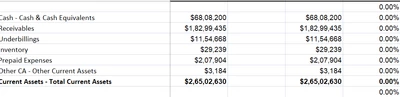
we have requirement to remove the zero from empty row when it is displayed in excel format. 
Ranvir06_0-1685013639607.png

As shown in the picture for empty row "0" should not present. Any solutions to this will be much helpful.

Thank You.

2 replies

Veteran
May 25, 2023

Hi Ranvir06 !
How is the report generated? If it is using a cube view connection, please check under data and select the row of your cube view. You will find the option there.

NicolasArgente_0-1685021454139.png


Newcomer
May 26, 2023

You can set your number formatting to this for the blank row:

ExcelNumberFormat = [" ";" ";" "]

This will yield a blank regardless of any number or 0 that is rendered. 

Ranvir06Author
Newcomer
May 26, 2023

Hi Ryannelissa, Thank you for the idea but we have one issue with this idea.

Ranvir06_0-1685107303053.png

As mentioned in above image we are able to remove zero from the row but when we click in the row it gets displayed as 0. Any ideas to this will be very helpful.

Thank You