
Newcomer
May 25, 2023
Solved

Remove suppression for blank rows

  • May 25, 2023
  • 1 reply
  • 0 views

Hello All,

We've created a cube view to which users can submit weekly numbers & commentary using excel cube view. The intention is to provide them with about 50 rows for commentary (Not all rows would be used each month). Hence, we intentionally want to keep blank rows without suppression for users to enter data. Is there a way for the blank rows to not automatically suppress? Every time we hit refresh all blank rows disappear.

We tried to toggle suppression settings in preferences to 'False' but no luck. Any help is appreciated!
    Best answer by NicolasArgente

    Hi Akshay ,

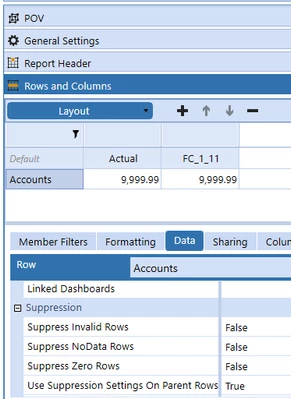
    In your cube view, under Data you should disable this option : 

    NicolasArgente_0-1685021395064.png


    1 reply

    Veteran
    May 25, 2023

    Hi Akshay ,

    In your cube view, under Data you should disable this option : 

    NicolasArgente_0-1685021395064.png


    AkshayAuthor
    Newcomer
    May 25, 2023

    Thanks a ton!

    Veteran
    May 25, 2023

    You are most welcome Akshay ! Please give a kudo if it answer your question. You can also select and approve the answer! Cheers.