

Contributor
March 2, 2022
Solved

Reducing size of the XFGetCell function

  • March 2, 2022
  • 5 replies
  • 0 views

The XFGetCell function has 20 arguments, when you have a large sheet (e.g. for data validation) there can be many of these functions increasing the size of the excel file.

In SmartView it was possible to create 1 cell with commonly used arguments and reference that cell at once. In OneStream i'm not able to do so. 

Off course i cannot imagine that SmartView has a feature that OneStream doesn't so i probably need to change my syntax a bit. Hope you guys can help.

So instead of:

=XFGetCell(TRUE, "Finance",$A274, "",F$4,F$14,F$5,F$2,$C274,$D274,F$3,$B274,F$6,F$7,F$8,F$9,F$10,F$11,F$12,F$13)

I want to create a cell (lets say A1) that has the content:

TRUE, "Finance",$A274, "",F$4,F$14,F$5,F$2,$C274,$D274,F$3,$B274,F$6,F$7,F$8,F$9,

So my formula would look like:

XFGetCell($A$1, F$10,F$11,F$12,F$13)

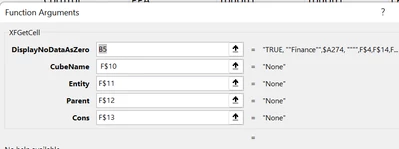
Unfortunately the function put double quotes around the cell so i get the whole string as my DisplayNoDataAsZero parameter and the next few down, missing many parameters (see picture below).
MarcR_0-1646232319629.png


Best answer by PeterFu

Hi Marc,


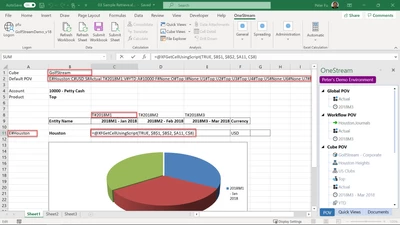
I think you are looking for the @XFGetCellUsingScript formula. See print screen below. My formula is picking up the Cube in B1, the POV from B2, entity in A11 and time in C8.

PeterFu_0-1646234481601.png

Peter

5 replies

PeterFuAnswer
Newcomer
March 2, 2022

Hi Marc,


I think you are looking for the @XFGetCellUsingScript formula. See print screen below. My formula is picking up the Cube in B1, the POV from B2, entity in A11 and time in C8.

PeterFu_0-1646234481601.png

Peter

MarcRAuthor
Contributor
March 2, 2022

Hi Peter, that was exactly what i needed! Thanks.

Do you know if there is a performance impact of using this function versus a regular XFGetCell?

Newcomer
March 2, 2022

Sorry Marc!


I do not know what the performance impact are on these 2 different approaches.


Peter

MarcRAuthor
Contributor
June 29, 2022

Hi Manish, we did not compare it 1 to 1 but have quite a large sheet which performs well so my current assumption is that there is no performance issue using this approach. Let me know if you find out differently.

Newcomer
May 21, 2023

I used this solution as well and would like to add you don't need to call out every dimension.  If you omit, I believe it behaves like QuickView and assumes the default POV.

gbftong_0-1684674361721.png


Newcomer
April 9, 2026

Hello, I have an issue on this function I just discovered. My excel is in french so I have ";" io "," and "VRAI" io "TRUE". Any ideas?

I copied the formula next to my "#VALEUR!".

Do not take into account the "TEST" value - the original formula and sheet has the good cube name