Contributor
Oct 31, 2024 10:22 AM UTC
Solved

recovering journal name on CV

Dear all,


Is there a way to show for instance journal data and also identify which are the names of the journals involved in a given intersection? For instance if there are 3 journals going to the same intersection, recover in a CV 3 lines, describing the detail for each journal name? 

Thank you in advance.

Best regards,

Carlos

HenningAnswer
Employee - Advisor
Oct 31, 2024 12:57 PM UTC

Hi, the easiest is to have a grid that displays the details you need upon the click of a cell in a cube view in my opinion. For this, take a look at the first answer in this post:

Solved: How to retrieve data on a selected row from a grid view inside a dashboard by clicking a button - OneStream Community

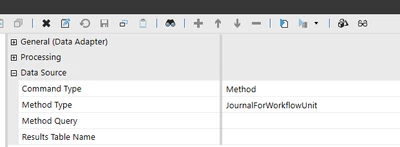
Instead of displaying details from Stage, you just display journals details instead. For that you can use a Data Adapter with the JournalForWorkflowUnit method query.
Henning_0-1730379306143.png

In the Method Query field you need to enter the corresponding query. If you run the data adapter with a blank field as in the screenshot, the system will return an error message that includes an example, such as:

{MyWorkflowProfileName}{Actual}{2015M1}{All}{Empty String or Filter Expression}.

And then you use the bound parameters to filter the returned table so that only journal line items that have been posted to the selected cube view cell get displayed in the data grid.

3 replies

HenningEmployee - AdvisorAnswer
Employee - Advisor
Oct 31, 2024 12:57 PM UTC

Hi, the easiest is to have a grid that displays the details you need upon the click of a cell in a cube view in my opinion. For this, take a look at the first answer in this post:

Solved: How to retrieve data on a selected row from a grid view inside a dashboard by clicking a button - OneStream Community

Instead of displaying details from Stage, you just display journals details instead. For that you can use a Data Adapter with the JournalForWorkflowUnit method query.

Henning_0-1730379306143.png

In the Method Query field you need to enter the corresponding query. If you run the data adapter with a blank field as in the screenshot, the system will return an error message that includes an example, such as:

{MyWorkflowProfileName}{Actual}{2015M1}{All}{Empty String or Filter Expression}.

And then you use the bound parameters to filter the returned table so that only journal line items that have been posted to the selected cube view cell get displayed in the data grid.

Contributor
Oct 31, 2024 1:10 PM UTC

Thank you Henning, I didn't know a solution as the one you propose.

Thanks!

Best regards,

Carlos

Employee - Advisor
Oct 31, 2024 1:28 PM UTC

Happy to help! Once you were able to get this running, this opens the door to a lot of possibilities for analyzing your data in a flexible and extremely granular way!

You can find more posts if you look for "method query", "data adapter", "grid view", etc.