
Newcomer
July 22, 2022

QuickView - MTD and YTD

  • July 22, 2022
  • 2 replies
  • 0 views

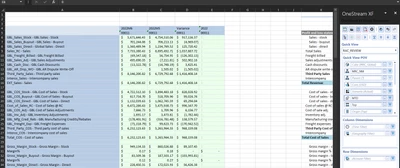
is it possible to get column E to show YTD values? if i change the view to YTD everything else changes to YTD. i tried using the getcelldata(#2022M1+2022M2 ......#2022M12) it works if i stop at #2022M6 but when i add the future months everything goes blank.

is it possibly to get YTD and MTD numbers in a QV? 
 

RustyShacklefor_0-1658513395071.png


    2 replies

    OneStream Employee
    July 23, 2022

    You can go to the column selector for time and add the view dimension like this:

    T#2022M6:V#MTD, T#2022M5:V#MTD, … , T#2022:V#YTD

    Veteran
    July 28, 2022

    Yes, set your View to V#Periodic and it'll be dynamic based on your time selection. So if you select T#2022M6 in one column and T#2022 in another, it'll show the MTD value where you've selected a month and the YTD value where you've selected the year. 

    One thing to keep in mind is for actuals this won't work if you're loading YTD numbers because the future month ahead of the one you've currently loaded will always calc to be the full reversal of your current period's YTD value (because there's nothing loaded for the YTD of next period so OS calculates next month's value to be the difference between 0 and last month's YTD value). It really only works for forecasting periods or years that are completed in the past. 

    Hope that helps but let me know if you have any questions. 

    Newcomer
    December 16, 2022

    I'm a little confused by this with respect to the balance sheet (and new to onestream).  I am in a quick view and toggling the periodic view.  I see no difference between having the YTD on vs. periodic.  Is there no way just to see the current month activity with the balance sheet in quick view?

    Newcomer
    December 16, 2022

    I guess I really don't understand what exactly the periodic view is....