
Newcomer
February 2, 2022
Solved

Quick View Text Alignment

  • February 2, 2022
  • 1 reply
  • 0 views

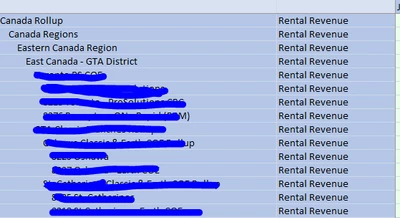
How do I make the entity column to align left? Excel has it's own formatting, but it changes back every time I refresh my workbook.  I'm using an excel-add-in.  Wondering if there is any alignment setting, that could be changed in OneStream.  
Mustafa_A_0-1643837269766.png

Any ideas? Thank you!

Best answer by db_pdx

Hi Mustafa_A: this is probably due to the member expansion you are using.

.Tree will expand with indentation

.Descendants / .DescendantsInclusive will expand without indentation

Play around with the member expansions and you should be able to find one that suits your needs.

Cheers,

-DB

1 reply

db_pdxAnswer
Contributor
February 3, 2022

Hi Mustafa_A: this is probably due to the member expansion you are using.

.Tree will expand with indentation

.Descendants / .DescendantsInclusive will expand without indentation

Play around with the member expansions and you should be able to find one that suits your needs.

Cheers,

-DB

Newcomer
February 3, 2022

Thank you for the explanation. That make sense.


we were able to figure out by using member expansion