Newcomer
Nov 24, 2023 11:10 AM UTC
Solved

Quick View - Annotations/Audit Comments/Variance Explanations

Would like to check if Quick View in excel can extract/pull - Annotations/Audit Comments/Variance Explanations from "View" dimension.

Please assist. Thank you.

MarkBirdAnswer
Veteran
Nov 30, 2023 11:04 AM UTC

Thank you Mark.. we tried moving the View filter to the columns and added "YTD" & "VarianceExplanation", it did not work. Showing below result


Pradnya_1-1701341701352.png

Am i missing anything?


Pradnya,

A couple of questions:

 - Are you sure that you have data for the intersection that you are looking at?

 - Have you managed to view this data in a Cube View?

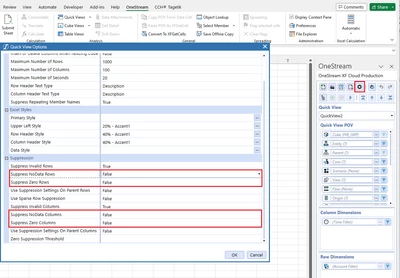
It might be helpful for you to change the row suppression settings on your cube view:

MarkBird_0-1701342227874.png


8 replies

Veteran
Nov 24, 2023 11:28 AM UTC

Hi Pradnya

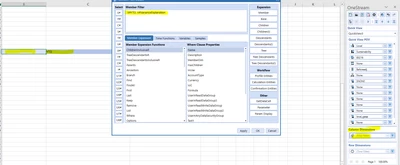
Just select the relevant view member:

MarkBird_0-1700825256397.png

Are you having any issues pulling this information into your Quick View? If so, send some screenshots.

Regards,

Mark


PradnyaAuthor
Newcomer
Nov 24, 2023 11:42 AM UTC

Yes, we did select the relevant view member "Variance Explanation"

Pradnya_0-1700826104006.png

We pull the numbers but not variance explanation.

Employee - Sage
Nov 27, 2023 3:27 PM UTC

Just switching to the right view should work; if it doesn't, there might be a regression and you might want to talk to Support about it.

PradnyaAuthor
Newcomer
Nov 29, 2023 1:39 PM UTC

Can you please elaborate when you say "Just switching to the right view should work"?
In View dimension we have "Variance Explanation", where user report/input variance explanation as text.

Veteran
Nov 29, 2023 3:27 PM UTC

Hi Pradnya

Can you try moving the View filter to the columns then add both 'YTD' and 'VarianceExplanation'.

Send us a screenshot so that we can see the output.

Regards,

Mark