
Newcomer
May 10, 2023
Solved

Percentage sign % with parenthesis () is displaying in the data explorer but not in the report.

  • May 10, 2023
  • 1 reply
  • 0 views

We have a requirement to make all the negative value to encode in parenthesis () and to display percentage % for the column "Variance vs Prior year %" in the Cube View. Anyhow, we have written formatting condition as

"If (ColName Contains '%') Then
ReportNoDataNumberFormat = [#,###,0.00;(#,###,0.00);0.00], ShowPercentSign = True
End If" 

and it works perfectly fine in the data explorer tab. But while running it in the report it displays only parenthesis () and the percentage sign is missing. 
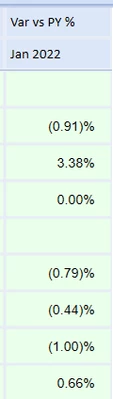
 

Nitishkrish16_0-1683703685846.png

The above is the screenshot from data explorer tab. 
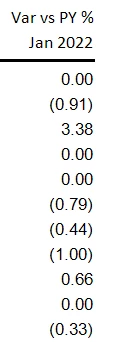
 

Nitishkrish16_1-1683703724706.png

The above is the screenshot from while running it in the report. 
 

Best answer by PeterFu

Hi,

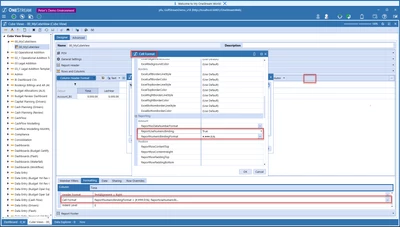
Go to the Cell format for the column you want to have percent sign. Then scroll down to the formatting for the Report, change ReportUseNumericBinding to True and set ReportNumbericBindingFormat to percent sign. See print screen belw.


PeterFu_0-1683705082617.png


1 reply

PeterFuAnswer
Newcomer
May 10, 2023

Hi,

Go to the Cell format for the column you want to have percent sign. Then scroll down to the formatting for the Report, change ReportUseNumericBinding to True and set ReportNumbericBindingFormat to percent sign. See print screen belw.


PeterFu_0-1683705082617.png


Newcomer
May 10, 2023

Thanks a lot 🙂