
Veteran
January 24, 2023

Passing a value in a book for a delimited list parameter doesnt seem to work.

  • January 24, 2023
  • 4 replies
  • 0 views

I have a parameter called IntigrityScaling with parameter type "Delimited List" as below
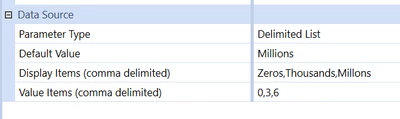
OS_Pizza_0-1674560496582.png

My cube view uses this delimited list twice.

1. As USD in |!!IntigrityScaling!!|   -> it is used to display the description of the value

2. Under formatting -> I am using Scale = |!IntigrityScaling!|

Cube view runs fine and prompt me to enter value for Scaling and and display both 1 and 2.

The issue is when i pass this parameter in a book , it doesnt take the value and prompts me to enter the delimited list parameter.
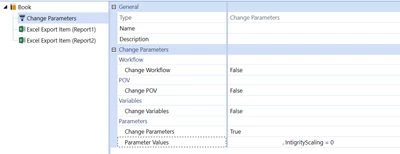
 

OS_Pizza_1-1674560802668.png

How do i pass a value to the delimited parameter without prompting me to enter ?

I dont want this prompt to pop up after i run the book.
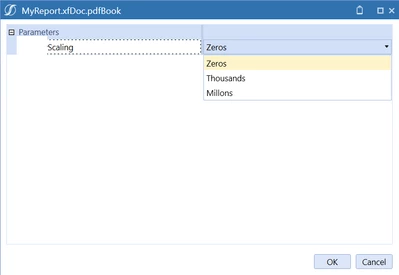
OS_Pizza_2-1674560981439.png

NOTE= Liter paramter works fine when passing from books


4 replies

OneStream Employee
January 24, 2023

Default Value should contain an actual value, not a display item. So in your case should be 6, not "millions".

OS_PizzaAuthor
Veteran
January 24, 2023

My bad ! I have changed it to 6. My concern is that delimited list paramter cannot be passed as a literal value in the books. It still gives prompt to select a value.

Newcomer
January 24, 2023

Do you have your scaling parameter set in the book as a required input parameters? If so, try removing it if you're passing through using a change parameter. 

OS_PizzaAuthor
Veteran
January 25, 2023

I don't have required input parameter.

Contributor
January 24, 2023

Make sure you are using the same parameter name in the 'Change Parameters' section of the report book as is used in the Cube View.  It looks like you are referencing a different parameter which is why you are being prompted for the parameter used in the Cube View.

Your screen shots show the Cube View parameter as Scaling while the Report Book you use IntigrityScaling

OS_PizzaAuthor
Veteran
January 25, 2023

I am actually using IntigrityScaling . Sorry for the confusion. Yet , it still prompts me to enter the scaling value.

Contributor
January 25, 2023

Gotcha.  Try your 'Change Parameter' as IntigrityScaling=[0]

Newcomer
January 25, 2023

Here is what I did to make it work.

ckattookaran_0-1674661353087.png

Then I had to change the cubeview to use |Loop1Variable| and |Loop1DisplayVariable|.

ckattookaran_1-1674661417297.png