Newcomer
November 25, 2024
Solved

Parent Name using UD8 Formula

  • November 25, 2024
  • 2 replies
  • 0 views

Has anyone been able to successfully obtain a parent name for a member, within a UD8 formula without needing to leverage a text field on the member (using Parent Sort Order for example)?

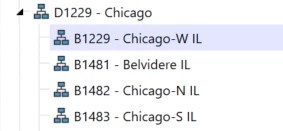
As an example, I have a base level entity member of B1229 (this is Branch). I would like to return D1229 - Chicago based on its' parent sort order of 2 (this is District).

Appreciate any insight!

B1229.png

Best answer by Henning

Not a bad idea, I never thought about that - i.e. I have never tested that. You could test it with a couple of parents and then write the parent list into the error log to see whether the parent sort order influences the order in the list. But I do recommend some alternating tests to really make sure it works and to rule out any accidental behavior that appears to be similar.


Ok, I tested it myself and parent sort order does not influence / determine the order within the list when the GetParents function is used. It seems that the member ID is driving this. Do not rely on this as the member ID can differ between applications for the same members.


I did look into the member properties that can be used but did not find any that includes the parent sort order that can be used to sort the list directly (something like list.sortBySortOrder).


You can, however, use this:

Api.Entity.ParentSortOrder()

This pulls the sort order number of a given member under a parent. You can then use this to determine the member using the sort order number you want. Not as pretty as I was hoping for but maybe someone here has a more pretty version of that in mind.

If you go down that route, make sure to document this well so that no one will ever set up a member without setting the sort order as needed.


Another edit:

Having said that, using a text field might be the superior solution. Depending on your exact use case of course. With a text field you can pull the desired parent directly from your member. No loop, just a single rule line.
With the above, one needs to pull the parents into a list, loop through the list and then use the one with the lowest parent sort order number (or whatever number one specifies).

Text attributes seem more user friendly, less error-prone and easier to maintain to me without knowing all the requirement details.

2 replies

OneStream Employee
November 26, 2024

Hi, the easiest to get / retrieve a member parent in the metadata may just be to use a text field if you need to retrieve a specific parent frequently.

You can also use things such as lookup tables if you have a more "mapping-type" logic in mind and retrieve the parents you need for your logic.


The challenge when using a rule is that each member can be shared across different hierarchies and therefor can have multiple parents. That is why when you use a rule to get the parents of a member, you will not get a single string name of a parent, you will get all parents in form of a list, e.g.:

Dim entityDimPk As DimPk = Api.Pov.EntityDim.DimPk
Dim parentList As List(Of Member) = Api.Members.GetParents(entityDimPk, memberId, False, Nothing)

There might only be a single parent, in which case you can use this, but if someone moves the member somewhere else, your logic breaks as the parent list then contains more than a single parent. So I recommend caution and careful and detailed documentation of this in case this is implemented.


Long story short, you will have to decide whether a text field or another solution serves your requirements best.


BWHITAKERAuthor
Newcomer
November 26, 2024

Thanks, Henning.

Was thinking we could assign a parent sort order to each of the hierarchy parents and then reference this in the formula depending on which parent we want to return.

OneStream Employee
November 27, 2024

Not a bad idea, I never thought about that - i.e. I have never tested that. You could test it with a couple of parents and then write the parent list into the error log to see whether the parent sort order influences the order in the list. But I do recommend some alternating tests to really make sure it works and to rule out any accidental behavior that appears to be similar.

Expert
November 26, 2024

Getting the parent member can be quite fiddly especially if your application is using org by period and you have many alternative roll ups. I have found that it is easier to approach it the other way - get the children of the parents rather than the parents of the children. I read through the parent members (sometimes I use an Text field to control which parents to include) and get their children. Save that information to a dictionary indexed by the children. And save it to Globals for efficiency. And then when I want the parent of the child I look up the parent from the dictionary which is indexed by the child. I find this method easier to code, understand and control.