
Newcomer
February 27, 2023

Page Numbering Format for Books

  • February 27, 2023
  • 2 replies
  • 0 views

Hi Just wondering if it's possible to format the page numbering when running books to ensure the output is based upon the page number and the total no of pages in the book.  For example if there were 30 pages in total in the book then I would need the format sequence as follows:

page 1 of 30, page 2 of 30, page 3 of 30 etc........... up to and including page 30 of 30.

With the current standard formula for suggested format : (i.e.)
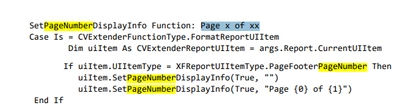
ABott73_0-1677516650368.png

The output is currently as follows:

page 1 of 1, page 2 of 2, page 3 of 3 etc............  (this isn't really useful for a book)


Thanks


2 replies

OneStream Employee
February 28, 2023

The posted formula works fine for me in OneStream 7.2.2: adding multiple Report items, {0} will contain the current page relative to the whole book, and {1} the total number of pages in the book. E.g. if ReportA has 1 page and ReportB has 2 pages, the footers will be "1 of 3", "2 of 3", and "3 of 3".

ABott73Author
Newcomer
March 1, 2023

Thanks for the quick response.  We are currently on 7.1.1 and with multiple reports in the book the page numbering isn't working correctly.  Do you know if there was a fix to it between versions?  If not then I'll see if there is something else causing the issue.

Thanks again

OneStream Employee
March 1, 2023

One thing to note is that i didn't bother with the first SetPageNumberDisplayInfo "dummy" call to clear it, i just went straight for the second one.

On fixes, I don't see anything in Release Notes but they don't list every little bug fixed. Maybe consider upgrading a dev environment to 7.2.2 and see how it goes.

T_Kress
OneStream Employee
OneStream Employee
December 11, 2023

Anyone have an update on whether this works in books or not?  I tried in version 7.2.4 and when I put several reports (cube views) into a book, each report itself comes out as:

Page 1 of 1

Page 2 of 2

Page 3 of 3

etc.


It is like it works for individual cube views but when cube views are combined in to a book, the numbering is not working.  Just wondering if a ticket was opened and this was resolved.

I found the case which was opened and the bug which was referenced as PF-19009. It looks like there is no workaround at the moment.  I will let another partner know and see if they want their customer added to this bug.