
Newcomer
June 18, 2026
Question

Number of Reports Published

  • June 18, 2026
  • 2 replies
  • 0 views

I am relatively new to OneStream and have recently taken responsibility for managing the platform within our organization.

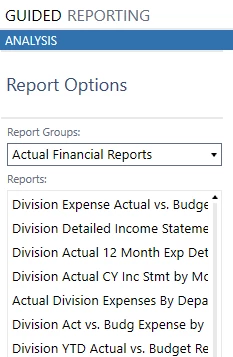
As I look for ways to improve the user experience, I feel our current reporting structure may be excessive. We currently have more than 90 reports available to users, including approximately 30 budget reports alone.  The data is basically formatted differently in each report (ie Monthly, YTD, FullYear) 

I am curious how other organizations manage and govern the Reports function. How many reports do you typically make available to licensed users, and what best practices have you found for balancing user flexibility with report standardization and simplicity?
 

2 replies

OneStream Employee
June 19, 2026

Hi Luke2026​ 

You are correct there are smart ways to approach cube view development, to do more with less

E.g using shared columns and / or rows or leveraging dashboard parameters, for example

This enables you to recover from subtle nuances between reports and avoid recreating multiple reports with minimal differences and maximum maintenance overhead

There should be quite a lot of content on Navigator (our Training site) to provide you with more insight on reporting generally (for Cube data it often starts with a Cube View) and if you have access to the Golfstream reference application, there are also lots of good examples there

Hope this helps

Sam

Newcomer
June 19, 2026

Hi Luke2026​ ,

Try to figure out the common reports headers and needs, example, same report they want in YTD, periodic, Quarterly. you can use parameter to pick the report. Cubeview are shareable between common columns or rows. 

  1. Shared cubeview columns/Rows
  2. Use parameters to differentiate the same report.
  3. in your screen i could relate there is one report with same common name Actual vs budget. 
  4. Understand the need of the report and usage of the reports and check with users whether they really using this report( not used you can make disable in profile view