Veteran
November 29, 2022
Solved

Need to pouplate Data unit statistics by scenario using rule or cube view.

  • November 29, 2022
  • 1 reply
  • 0 views

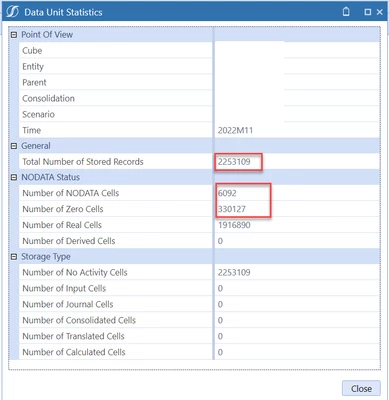
I am looking for a Business rule function to write "data unit statistics" filtering on Year,month &Scenario.

(OR)

Cube view which can display DUS on the report.


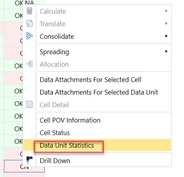
PS- I know we can right click on calcstatus to get the DUS but require something which can create a report/write to a table for DUS>
 

Manish_K_0-1669718178660.png

Manish_K_0-1669718861390.png


Best answer by JackLacava

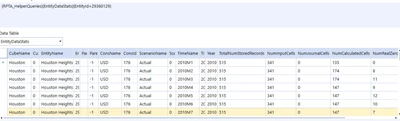
For this sort of thing, it's typically useful to scavenge the Standard Application Reports. Just identify a report that contains what you need (in this case, "Entity Data Statistics" looks like a good one), find it in the Dashboard Maintenance Unit "XFS Application Reports (RPTA)" under Components / Reports (rpt_EntityDataStats_RPTA), then look at the Data Adapters attached (EntityDataStats_RPTA). In this case, it's powered by a Dashboard DataSet, which you can then copy and modify - or simply use it in your own adapter as it is. Here is a sample of its output:

JackLacava_0-1669725589393.png


1 reply

OneStream Employee
November 29, 2022

For this sort of thing, it's typically useful to scavenge the Standard Application Reports. Just identify a report that contains what you need (in this case, "Entity Data Statistics" looks like a good one), find it in the Dashboard Maintenance Unit "XFS Application Reports (RPTA)" under Components / Reports (rpt_EntityDataStats_RPTA), then look at the Data Adapters attached (EntityDataStats_RPTA). In this case, it's powered by a Dashboard DataSet, which you can then copy and modify - or simply use it in your own adapter as it is. Here is a sample of its output:

JackLacava_0-1669725589393.png


OS_PizzaAuthor
Veteran
November 29, 2022

JackLacava  Thank you captain !