
Narrative reporting table formats in Word
We are using v8.5 and inserting document variables into our Word document from a Named Range in a spreadsheet using the merge format option:
{DOCVARIABLE "{XF}{Application}{File}{Documents/Public/Extensible Documents/Performance Reporting/MPR.xfdoc.xlsx}""ExcelNamedRange=CapInvGrp"\* MERGEFORMAT}
The tables are formatted in Excel with column widths, shading, borders, numbers formats.
In the Word document, we apply styles to these tables to correct the row height and spacing. One style applies to the headers (left aligned) and another to the value cells (right aligned).
When an artefact is refreshed, the formats are maintained and shown correctly for all but the very last cell in every table, which reverts to the "Normal" style:
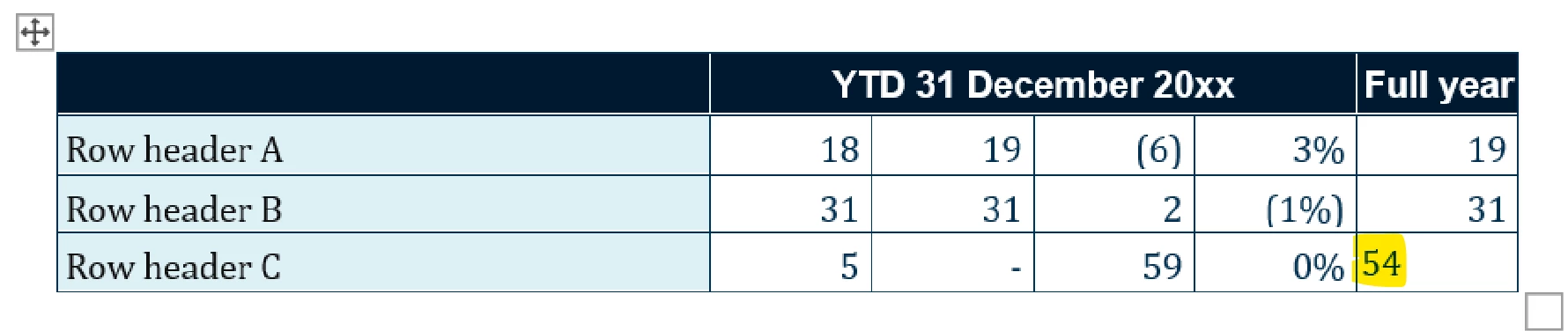
The number style is set up with the “Style for following paragraph” option as the same style.
Any idea why this happens and how we can correct it? Alternatively, is there a better way to force the row spacing in the Word tables without losing it on refresh?