


Member
August 21, 2026
Solved

Multiple-row sharing specification for cube view

  • August 21, 2026
  • 4 replies
  • 57 views

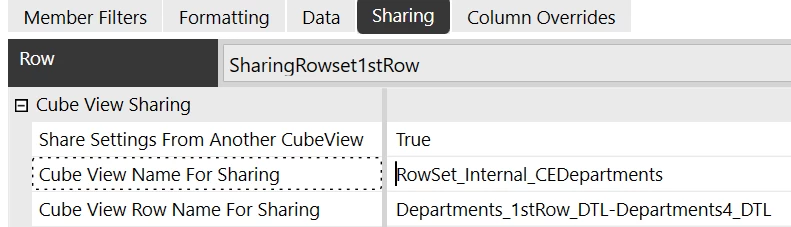
Good day!  I am successfully using Specified Row sharing. According to the community AI, I should be able to specify a range of rows to be shared by specifying them as FirstRow-LastRow but this does not seem to work. Is this an AI hallucination?


Best answer by sameburn

Hi ​@MacA 

Thanks.  This is helpful.  Yes I think it is referring to Column / Row Overrides here; which are different to Column / Row sharing.  These are also documented separately in D&R e.g. Build a Simple Cube View

Here we can pass in a row range; so the Community AI is correct.  But the functionality here is to provide an override of a Column and / or Row index; not to share values from another Cube View

Hope this helps

Sam

4 replies

Advisor
August 24, 2026

Hi ​@MacA 

Can you share the answer you received from Community AI?  When I search here it just brings up this post.  

I don’t believe this is possible with Cube View Sharing based on properties available to us on the Sharing setup tab of a Cube View e.g. your screenshot above.

This is the advice from the Design & Reference on Cube View Sharing - Build a Simple Cube View

Hope this helps

Sam

MacAAuthor
Member
August 24, 2026

Hi ​@sameburn 

You are in luck.  I saved a screenshot.


Questionable instructions
​​​​​​


sameburnAdvisorAnswer
Advisor
August 24, 2026

Hi ​@MacA 

Thanks.  This is helpful.  Yes I think it is referring to Column / Row Overrides here; which are different to Column / Row sharing.  These are also documented separately in D&R e.g. Build a Simple Cube View

Here we can pass in a row range; so the Community AI is correct.  But the functionality here is to provide an override of a Column and / or Row index; not to share values from another Cube View

Hope this helps

Sam

MacAAuthor
Member
August 24, 2026

Thanks ​@sameburn.  The AI’s answer does not apply to 

I will mark this as answered.