
Newcomer
June 30, 2022
Solved

Member list parameter formatting

  • June 30, 2022
  • 2 replies
  • 0 views

Hi,

Is there a way to format the options in a member list parameter to only display the member description? I've tried using :Name(|MFUD1Desc|) but this doesn't change the outcome visible to the end users.
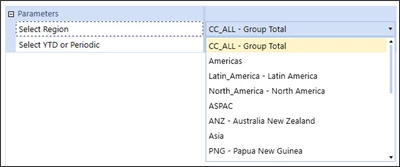
SamKing_0-1656626002771.png

Thanks,

Best answer by db_pdx

Hi SamKing: this is controlled by the 'Display Member' field in the Parameter Settings.  Valid options are:

  • Name
  • Description
  • Name and Description

Name here means MemberName and Description means MemberDescription.  Change to 'Description' and you should be all set.

Cheers   -db

2 replies

db_pdxAnswer
Contributor
June 30, 2022

Hi SamKing: this is controlled by the 'Display Member' field in the Parameter Settings.  Valid options are:

  • Name
  • Description
  • Name and Description

Name here means MemberName and Description means MemberDescription.  Change to 'Description' and you should be all set.

Cheers   -db

Newcomer
November 9, 2023

Hi db,

How do I navigate to parameter settings? I'm trying to fetch the name and description for a drop down in a member dialog. I'm using version 8

Contributor
November 9, 2023

Hi sukensheth: I'm not on version 8, but I will assume its the same as my current version.  Application > Dashboards > Select your relevant parameter > Display Member

SamKingAuthor
Newcomer
July 3, 2022

Thanks db, worked like a charm!

As a side note, is there a way to format dimensions in a combo box? We have combo boxes in dashboards that allow users to filter by entity, it would be of great use if we can highlight in bold selections that are consolidations, i.e. European entities consolidated. These consolidation entities contain the prefix 'E_'.

Contributor
July 5, 2022

I don't believe there is a way to format individual items within the list of values that are displayed in the combo box.  The formatting parameters would apply to the entire combo box.

However, you could do some visual indentation as a potential method for achieving your desired result.  Reference post here: Question: Can I create a dashboard dropdown or list box which contains a representation of a hierarchy with indentation? - OneStream Community (onestreamsoftware.com)

This is definitely on the advanced side.  It takes advantage of Bound List parameters which can have a Display value be a unique/arbitrary representation of the selection while returning the MemberName for consumption by the result of the dashboard components.

SamKingAuthor
Newcomer
July 7, 2022

Thanks - whilst not ideal it will better outline the hierarchy to users who aren't as well-versed in the corporate structure.