
Veteran
April 1, 2022

Max/Min Calculation Row in CV

  • April 1, 2022
  • 1 reply
  • 0 views

Hello! 

I received a request to add a maximum and minimum line to a cube view. The cube view shows entities in columns and a variety of accounts in the rows (not together in a hierarchy, so no .base or .children, just a list separated by commas). 

Max/min aren't available in the "getdatacell expressions" area so I emailed support to see if it's possible and they directed me to a ranking BR in GS. I loaded the BR, added a row to my CV and updated the pull but still am getting no data. Honestly, I don't think this BR and pull are the solution for what I'm trying to do but I don't know of any other way. 

Do any of you have samples of pulling something similar? Were you able to get a max and min in a CV via CV math or some other way? 

Appreciate any help I can get - thanks! 

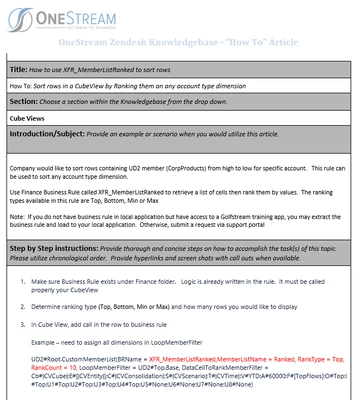
Here's the KB article provided for reference: 
NicoleBruno_0-1648826877785.png


And the GS CV is in CVs > XFR Member filters (E) Member list using business rule > XFR Member List (C) Ranked Entity Sales. 

1 reply

Newcomer
April 1, 2022

What is your criteria? Show us the member filter from the cube view for the min and max lines.

Veteran
April 4, 2022

Hello!

Nothing works but here's what was in the KB article OS support suggested: 

Example – need to assign all dimensions in LoopMemberFilter

UD2#Root.CustomMemberList(BRName = XFR_MemberListRanked,MemberListName = Ranked, RankType = Top, RankCount = 10, LoopMemberFilter = UD2#Top.Base, DataCellToRankMemberFilter = Cb#|CVCube|:E#[|CVEntity|]:C#|CVConsolidation|:S#|CVScenario|:T#|CVTime|:V#YTD:A#60000:F#[TopFlows]:O#Top:I#Top:U1#Top:U2#Top:U3#Top:U4#Top:U5#None:U6#None:U7#None:U8#None)


And this is the sample pull suggested in the Golfstream BR: 

E#Root.CustomMemberList(BRName = XFR_MemberListRanked, MemberListName = Ranked, RankType = (Top,Bottom,Min,Max), RankCount = X, LoopMemberFilter = E#Root.Base, DataCellToRankMemberFilter = CB#:E#... )

This is what I tried and got nothing (no rows added to the CV): 

A#Root.CustomMemberList(BRName = XFR_MemberListRanked, MemberListName = Ranked, RankType = (Min), RankCount = 1, LoopMemberFilter = A#Assets_Tot, DataCellToRankMemberFilter = Cb#Global:C#local:S#Actual:V#YTD:F#EndBal:O#Top:I#Top:U1#ISNaturalDetail_TOT:U2#Total_Product:U4#TopUD4_NDC:U5#TopUD5:U6#TopUD6_DPT:U7#None:U8#None)


And this one gave me an error: 

A#Root.CustomMemberList(BRName = XFR_MemberListRanked, MemberListName = Ranked, RankType = (Min), RankCount = 1, LoopMemberFilter = A#Assets_Tot, DataCellToRankMemberFilter = Cb#Global:C#local:S#Actual:V#YTD:F#EndBal:O#Top:I#Top:U1#ISNaturalDetail_TOT:U2#Total_Product:U4#TopUD4_NDC:U5#TopUD5:U6#TopUD6_DPT:U7#None:U8#None)

NicoleBruno_0-1649079231288.png


Newcomer
April 4, 2022

Try this one. 


A#Root.CustomMemberList(BRName = XFR_MemberListRanked, MemberListName = Ranked, RankType =Min, RankCount = 1, LoopMemberFilter = A#Assets_Tot, DataCellToRankMemberFilter = Cb#Global:C#local:S#Actual:V#YTD:F#EndBal:O#Top:I#Top:U1#ISNaturalDetail_TOT:U2#Total_Product:U4#TopUD4_NDC:U5#TopUD5:U6#TopUD6_DPT:U7#None:U8#None)