
Newcomer
June 14, 2022
Solved

Load comments to the cells through Data input or Forms

  • June 14, 2022
  • 9 replies
  • 0 views

Team


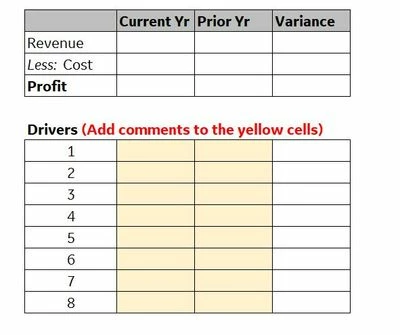
Is there a way we can add long text like comments to the cells through Forms? 

Am trying to build a cube view with data and comments to it which is visible on view rather than adding it as "note" or "attachments".

Please see the sample image below on the requirement.
Add_Comments.JPG


Best answer by NicolasArgente

Then if it is a digit, you should put back the YTD in view. Then input the digit and it will naturally agregate REVENUE to INCOME STATEMENT. Also in the Origin, please select FORMS.

9 replies

Veteran
June 14, 2022

Hello,

Use view member "annotation" to capture comments at some specific Time say WFYearM12, etc. 


Veteran
June 14, 2022

Hello SKVK,

Yes it is possible to load text like comments in OneStream using a form. To do that, you will need for example to change the VIEW dimension to Annotation for example.
In your example, you might need a row/column override also 🙂
Please give a kudo if it helps

SKVKAuthor
Newcomer
June 14, 2022

Thank you Bharti and Nicolas.. I ended up having the forms in unedit state.. I see the cells green in color v/s white. Can you please help what needs to be checked to have the columns in form as "white" to be edited.

Veteran
June 14, 2022

Please check all other dimensions, to be able to see a white cell, its POV should have all intersections from leaf nodes, allow input property on the cube view and dimension members should be "True", user should have write access to this cell. 

Contributor
June 14, 2022

View dimension has 5 members designed to hold text instead of numeric values (see screenshot)

YanSavinsky_0-1655205512380.png

You can create a column in your form's underlying cube view focused on one of those members:

YanSavinsky_2-1655205559782.png


SKVKAuthor
Newcomer
June 14, 2022

Thank you NidhiMangtani YanSavinsky MarkMatson NicolasArgente for your tips to get this going. I was able to get to the edit screen where am able to Input the data. Might be am missing the final step where the data needs to be calculated/consolidated, which is not happening. (Even after running those)

Here are the screenshots of the setup. Pls advise where am i missing.

111.JPG


222.JPG


333.JPG

Regards

SKVK


Veteran
June 14, 2022

It is difficult like this to find out. Could you do a right click and show us your CELL POV INFORMATION?
Did you check that the Origin dimension is on Forms? Or beforeadj?

SKVKAuthor
Newcomer
June 14, 2022

Sure.. I have selected "Top" as origin dimension as the cell inputs are independent of other columns/data.

SKVK_0-1655220126279.png


Veteran
June 14, 2022

How do you calculate the contribution? When you right click on the 1000 value, what is the View member on?
You will need to change the VIEW Annotation to YTD to see a value. When you do, do you see it or not? Annotation is only used for text...

SKVKAuthor
Newcomer
June 16, 2022
  1. Contribution margin has a formula assigned (Revenue - Cost of goods sold variable)
                    Return api.Data.GetDataCell("A#Revenue + A#[Cost Of Goods Sold Variable]")

      2. When you right click on the 1000 value, what is the View member on? - It has Annotation

      3. After changing VIEW to YTD, i return back to green cells

Veteran
June 16, 2022

SKVK, is it normal in your case that the 1000 value is stored as annotation? Annotation is used to stored text and not digit. Also, if you have no value it seems on revenue... why is that?

SKVKAuthor
Newcomer
June 16, 2022

1000 is a random number i input in the cell. Basically, i would like to input numbers in all the level 0 members.

And the parents should aggregate or calculate automatically. Am i missing something in the setting?

Veteran
June 16, 2022

Then if it is a digit, you should put back the YTD in view. Then input the digit and it will naturally agregate REVENUE to INCOME STATEMENT. Also in the Origin, please select FORMS.

SKVKAuthor
Newcomer
June 22, 2022

Thank you so much !!!! The only thing i was missing in the entire process was to set Origin as "Forms"..