Solved
Inverse Currency Rate
Hello everyone,
I'm making a cubeview and want to put in a formula to show the inverse of our currency rates. Is there a formula I can do like using a get data cell or something similar that could work?
Thanks,
Will

Hello everyone,
I'm making a cubeview and want to put in a formula to show the inverse of our currency rates. Is there a formula I can do like using a get data cell or something similar that could work?
Thanks,
Will
WillVitaleI am not sure if you are looking to display inverse rate in the cube view cell. If yes, Check below
1. Create two members under Accounts or UD8 . That will be your choice of dimension.
I am using Account here .Make sure to put the account/FormulaType as DynamicCalc
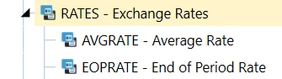
2. Under Formula - Use the below code for AVGRate. Simillarly create the same for EOPRate (api.FxRates.GetFxRateTypeForAssetLiability().Name)
Dim fxRateTypeName As String = api.FxRates.GetFxRateTypeForRevenueExp().Name
Dim timeId As Integer = api.Pov.Time.MemberId
Dim sourceCurrencyId As Integer = api.Pov.Cons.MemberId
Dim destCurrencyId As Integer = api.Members.GetMemberId(Dimtype.Consolidation.Id, "USD")
Dim averageRate As Decimal = api.FxRates.GetCalculatedFxRate(fxRateTypeName, timeId, sourceCurrencyId, destCurrencyId)
Return averageRate
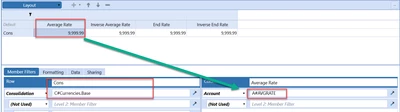
3. Create the Cube View with fist column as AvgRate and then next column as inverseavgrate. (Repaet for EOPRate)
A#AVGRATE
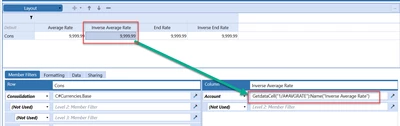
GetdataCell("1/A#AVGRATE"):Name("Inverse Average Rate")
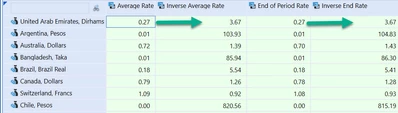
RESULT
Enter your E-mail address. We'll send you an e-mail with instructions to reset your password.