
Contributor
May 30, 2023
Solved

How to show Time header in a column to show blank in a CV

  • May 30, 2023
  • 2 replies
  • 0 views

Hello,

I'm currently trying to build a CV for my team. In the column filter I have time as the first member filter and account as the second member filter, but when I put as my account name A#None:Name(" ") it still gives a the WF Time. Is there a way to make it show as blank? Sort of like the account? I have a parameter created where it makes the background and text to be the same color and I would think it would also make everything show as blank, but it doesn.
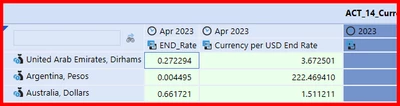
WillVitale_0-1685480176473.png

This is the parameter for the blank row
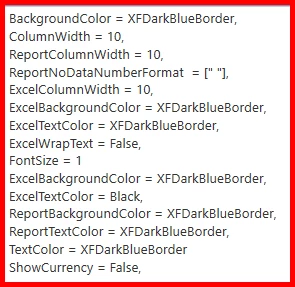
WillVitale_1-1685480209324.png

Thanks,

Will

Best answer by AK1

For Blank columns, please try updating the Member Expansion 1 as T#|WFTime|:Name( )

2 replies

AK1Answer
Newcomer
May 31, 2023

For Blank columns, please try updating the Member Expansion 1 as T#|WFTime|:Name( )

Contributor
June 2, 2023

Thanks AK. That did the trick.

Newcomer
May 31, 2023

Hey WillVitale, AK's recommendation should do the trick. Also to make your life easier in your parameter you can add the below statement, and then just rename the columns you need as dividers to include the word "blank". (same applies to Rows, just use RowName instead). 

If (ColName Contains 'Blank') Then
ReportNoDataNumberFormat = [" "], Bold = False, ReportUseTopBorder = False, BackgroundColor = Transparent, GridLinesColor = Transparent, NegativeTextColor = Transparent, SelectedGridLinesColor = Transparent, TextColor = Transparent, WriteableBackgroundColor = Transparent
End If

You can then update your "Cell Format" default and all blank columns / rows will update automatically. 

In addition, under Header Format; you can add ShowDimensionImages = False (just makes it a bit prettier) 

dimitriosc_0-1685514914100.png

Hope that helps!

Dimitrios 


Contributor
June 2, 2023

Thanks Dimitrios! I will updated my parameter to include that!

Will