Newcomer
December 11, 2023
Solved

How to scale numbers in a graph made in Report Designer

  • December 11, 2023
  • 1 reply
  • 0 views

Good evening,

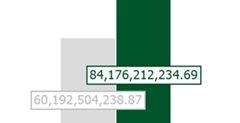
I would like to ask if it is possible to change the scaling from ##,###,###.## to ##.## in the Report Designer feature of the Report component.

The data is read from a cube view with a scaling already entered. However, because I use an MD cube view in the data adapter, the scaling set is lost. Currently, by changing the setting in the Text Pattern, the desired result does not occur; I wonder if it is possible to change the Text Pattern so that it returns the desired result. Alternatively, if there is another way to solve this problem.

Thank you


Fh1_2-1702317156089.png


Best answer by JackLacava

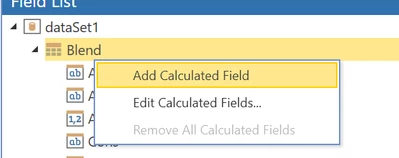
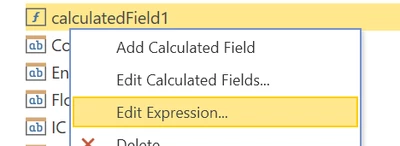
Use a Calculated Field, it's the easiest and most powerful option. 

JackLacava_0-1702321177575.pngJackLacava_1-1702321198663.png

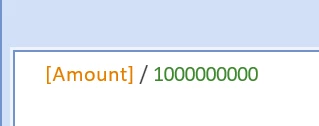
JackLacava_2-1702321311175.png

In the formula you can also Round your values. Any further formatting (currency, etc) will be done in the Text Pattern, because we want to keep returning pure numbers.

1 reply

OneStream Employee
December 11, 2023

Use a Calculated Field, it's the easiest and most powerful option. 

JackLacava_0-1702321177575.pngJackLacava_1-1702321198663.png

JackLacava_2-1702321311175.png

In the formula you can also Round your values. Any further formatting (currency, etc) will be done in the Text Pattern, because we want to keep returning pure numbers.

Fh1Author
Newcomer
December 12, 2023

Thank you very much JackLacava