Newcomer
September 22, 2022
Solved

How to leave Column Headers blank

  • September 22, 2022
  • 1 reply
  • 0 views

Hi,

New user here.  I have a report I'm building to show current year to date and prior year to date metrics, each with a variance column followed by a blank one as shown in the example screenshot below.

 

OneStream_Column_Headers.JPG


I'd prefer to see 8/22 - 8/21 below each Variance column.  If not, then just blanks for both Aug 2021 and YTD.  Additionally, I'd like to see nothing in the blank columns where it currently shows None, Aug 2022, and YTD. 


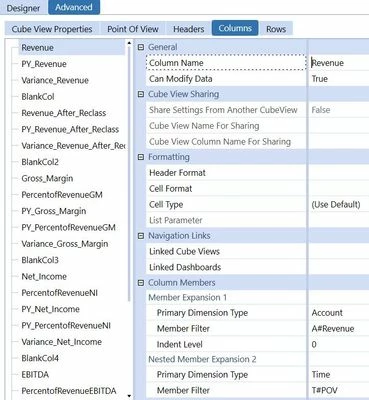
Below are the settings I have for Headers and Columns, respectively.
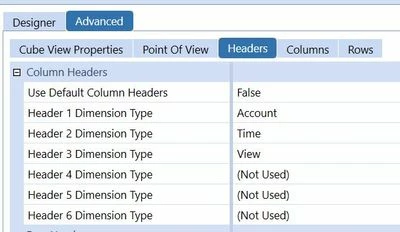
 

Advanced_Header_Tab.JPGAdvanced_Column_Tab.JPG 

Thank you,

Best answer by molly_lvc

Can you try adding a space between the parenthesis after Name? So that your member filters would read A#None:Name( ) and T#POV:Name( ). It looks like it defaults to the member name unless you have a space in there.

1 reply

Contributor
September 22, 2022

Hello!

In order to show a blank column name, you would need to add a Name function to your cube view column.

For example, if your formula is T#2021M8, it would become T#2021M8:Name( ). Similarly, your view formula would be V#YTD:Name( ). It's essentially overriding the name to a space or blank value.

Hope this helps!

mreidTNTAuthor
Newcomer
September 22, 2022

Hi Molly,


Thanks for your note.  I sent the wrong screen shot.  The one I sent was from a Revenue column.  Below is an example of what I have for my blank columns.


mreidTNT_0-1663875886645.png

Still returns the following names in the header spots within the columns.

mreidTNT_1-1663875973673.png


molly_lvcAnswer
Contributor
September 22, 2022

Can you try adding a space between the parenthesis after Name? So that your member filters would read A#None:Name( ) and T#POV:Name( ). It looks like it defaults to the member name unless you have a space in there.