Newcomer
December 14, 2023
Solved

How to keep CV formatting when exporting to Excel?

  • December 14, 2023
  • 1 reply
  • 0 views

I need help with keeping some CV formatting when exporting to Excel. The current CV I've built works just fine, but when the client exports to Excel, some of the percent values are truncated to the whole number and the '%' is removed.

EX: OneStream CV shows a cell value as "35.6%", but Excel shows "35"

I've tried to mess around with the Excel formatting in the designer tab for CV's, but I cannot get the setting to carry over during export. Any advice would be much appreciated! 
Best answer by plaabs25

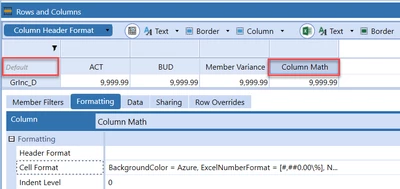
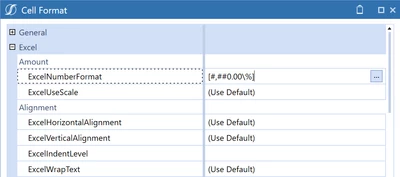
You mention that some of the percent values are truncated. I would double-check the ExcelNumberFormat you have on the default settings of your CV as well as your rows and columns. If you have formatting on both default as well as columns, the column format will override the default settings. If that doesn't help, can you provide some screenshots of your ExcelNumberFormat for both default and the rows/columns not showing the correct format to help us see some of your settings? 

plaabs25_0-1702579287113.png

plaabs25_1-1702579322797.png


1 reply

plaabs25OneStream EmployeeAnswer
OneStream Employee
December 14, 2023

You mention that some of the percent values are truncated. I would double-check the ExcelNumberFormat you have on the default settings of your CV as well as your rows and columns. If you have formatting on both default as well as columns, the column format will override the default settings. If that doesn't help, can you provide some screenshots of your ExcelNumberFormat for both default and the rows/columns not showing the correct format to help us see some of your settings? 

plaabs25_0-1702579287113.png

plaabs25_1-1702579322797.png