Veteran
November 24, 2022

How to insert a text box in the right side of a report

  • November 24, 2022
  • 3 replies
  • 0 views

I want to creat a report as below. The issue is with the Comments under column2 , I want to insert something lika a text box where i can write in a paragraph for summary.
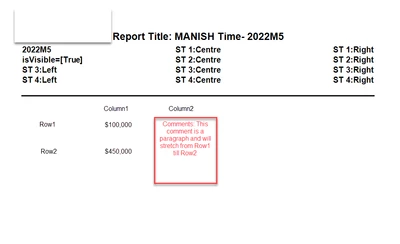
Manish_Agrawal_0-1669270924079.png

Thanks in advance !


3 replies

OneStream Employee
November 24, 2022

You can play around with the formatting options of rows and columns...

JackLacava_0-1669283989359.png

... but in the end, a cube view is just a table and will always be a table. If you need more control on the overall layout, you'll have to look into the Report Component, which you can create under Dashboards (create a Maintenance unit, select Components, click Create Component and select Report).


OS_PizzaAuthor
Veteran
November 25, 2022

JackLacava  I have tried creating a dashboard -> reports -> using Cube view as a data adapter.

Once you import the cube view layout , it looks something like this in the designer page. I want to add a text box on the right side of the page so that it stretches all down the rows .

Not working

Manish_Agrawal_0-1669351385747.png

expected like this

Manish_Agrawal_1-1669351396558.png


OneStream Employee
November 26, 2022

This used to be easier with wizards in the old Reporting Studio, it seems a bit harder now - I tried but couldn't achieve it...

My two suggestions are:

  • Design an actual Dashboard, where you can use the Table layout type to have labels besides a whole Cube View; you can then export that Dashboard to PDF.
  • Contact Support and ask them how they'd solve it 😅

Sorry!

OS_PizzaAuthor
Veteran
November 27, 2022

JackLacava 

I was thinking can we achieve this by creating a xfdoc and placing cubeview on the left side and the comment box on the right side.


OneStream Employee
November 28, 2022

I think that might be an option, but I'm not terribly familiar with the extensible docs.
