Newcomer
April 19, 2022
Solved

How to call Data Adapter in a Business Rule?

  • April 19, 2022
  • 3 replies
  • 1 view

I'm working with a BI Viewer and working out how to sort the dates within the Time data set. Is their an API that allows to call the data adapter used within a dashboard?

Currently the dates on the X-Axis are disorganized and are being sorted based on M1x, M2x which causes October (M10) to precede after January (M1). 
Best answer by Avatar-Roku

Hi MarkHoughton 

Apologies that I wasn't able to update this post earlier. But I was able to find a fix to this date issue - 

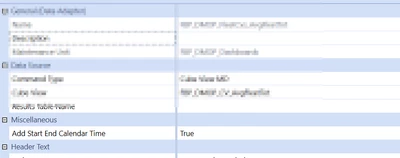
You would need to switch this to TRUE

Mustafa_A_0-1653660566377.png

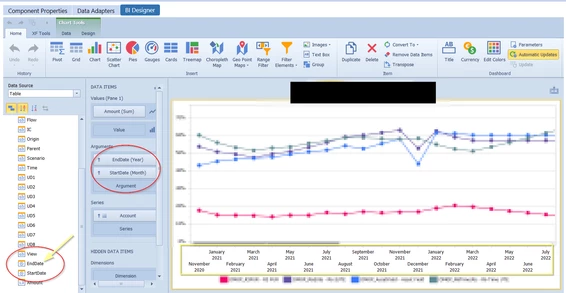
Now go back to your BI-Viewer. This should add "Start" and "End" Date data-items. Drag it to your argument pane and that should fix the dates on the axis. Hope this helps you save development time.

Mustafa_A_1-1653660874575.png


3 replies

OneStream Employee
April 19, 2022

Yes you can call a Data Adapter using this method:
brapi.Dashboards.Process.GetAdoDataSetForAdapter

This is a snippet from which you should be able to adapt for your purposes, so you can get time-sorted pivot tables/pivot grids.

Dim dctVars As New Dictionary(Of String, String)
dctVars.Add("Cube", "MyCubeName")
dctVars.Add("Entity", "E1001")
dctVars.Add("SomeOtherParamX", "XXXX")
dctVars.Add("SomeOtherParamY", "YYYY")

Using ds As DataSet = brapi.Dashboards.Process.GetAdoDataSetForAdapter(si, False, "AdapterName", "ResultsTable", dctVars)
    If ds.Tables.Count > 0 Then ' -- If there are >0 tables in the results
        Using dt As DataTable = ds.Tables(0).Copy()

            For Each dr As DataRow In dt.Rows
                Dim strTime As String = dr("Time").ToString()
                If strTime.Length = 6 Then
                    ' convert e.g. 2022M1 to 2022M01
                    strTime = strTime.Substring(0, 5) & "0" & strTime.Substring(5, 1)
                    dr("Time") = strTime
                End If
            Next

            Return dt ' --- return this modified table to the BI Analytics component

        End Using
    End If
End Using


Newcomer
April 19, 2022

Hi ChrisLoran 

Very helpful post.

What is the purpose of  dctVars?

Dim dctVars As New Dictionary(Of String,String)
dctVars.Add("Cube","MyCubeName")
dctVars.Add("Entity","E1001")
dctVars.Add("SomeOtherParamX","XXXX")
dctVars.Add("SomeOtherParamY","YYYY")


and how do you reference this rule within Dashboard BI component? 

Newcomer
April 19, 2022

To pass-in any optional parameters to the data adapter.

OneStream Employee
May 27, 2022

You could use the FDX queries to extract the Cube View data directly into a DataTable, then iterate through the rows and replacing time names with sortable names, e.g. 2022M5 --> 2022M05.
The FDX would not require a separate Data Adapter to retrieve the cube view information.

Here is a sample on how to fake the period names so the BI Viewer components will sort them in the correct order (rename the .txt to .xml before importing)

To call this from a Data Adapter, here is a sample query:
{SortCubeViewTest}{GetCubeViewData}{CubeViewName=[PPE],|!WfProfile_Assigned_Entities!|}

Snippet

Case Is = DashboardDataSetFunctionType.GetDataSetNames
    Dim names As New List(Of String)()
    names.Add("CubeViewTest")
    Return names

Case Is = DashboardDataSetFunctionType.GetDataSet
    '-- {SortCubeViewTest}{GetCubeViewData}{CubeViewName=[cube view name]}
    If args.DataSetName.XFEqualsIgnoreCase("GetCubeViewData") Then

        Dim strCVName As String = args.NameValuePairs("CubeViewName")
        Dim nvbParams As New NameValueFormatBuilder(String.Empty, args.CustomSubstVars, False)

        Dim dtResults As DataTable = brapi.Import.Data.FdxExecuteCubeView(si, strCVName,
                                                                            "HoustonEntities", "E#Houston",
                                                                            "Scenarios", "S#Actual",
                                                                            "T#2018M1", nvbParams, False,
                                                                            True, String.Empty, 2, False)
        If Not (dtResults Is Nothing) Then
            For Each dr In dtResults.Rows
                Dim strTime As String = dr("Time").ToString()
                If strTime.Length = 6 AndAlso strTime(4) = "M"c Then
                    strTime = strTime.Substring(0, 5) & "0" & strTime.Substring(5, 1)
                    dr("Time") = strTime
                End If
            Next
        End If
        Return dtResults

    End If
End Select


Result: notice the Time column is now been 'faked' into a sortable name.
If you want to make it like "Jan","Feb","Mar" then the BI Anaytics components will probably sort it alphabetically and mess up the order again.  You would need to show both columns, one to force the sort order, and another for the descriptive part.

ChrisLoran_0-1653659820233.png


Contributor
May 27, 2022

Hi Chris,

Thanks for the explanation, very interesting.

Cheers

Mark