
Newcomer
December 14, 2023
Solved

How to add a formula in a cubeview

  • December 14, 2023
  • 1 reply
  • 0 views

I'm looking to add a formula that takes an account and subtracts the difference between two scenarios. So, something like this: GetDataCell(A#ProductionTCFacSTd:S#Target_FY24) - GetDataCell(A#ProductionTCFacSTd:S#Target_FY24_SC). Can you please help see what I need to do to make this work in my cube view?
Best answer by MarkBird

Hi bisenhart, we need a bit more information to help you.

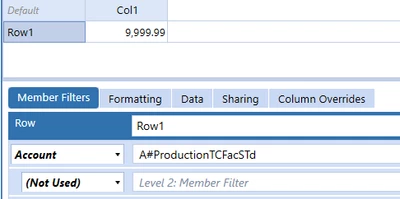
But it should be very simple, first, put the account filter in your row definition E.g.:

MarkBird_0-1702569183259.png

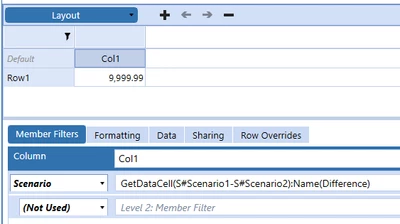
Then in your row definition you can put the variance formula:

MarkBird_1-1702569250557.png

You have a few different options that you could use:

  1. GetDataCell(Variance(S#Target_FY24_SC,S#Scenario2)):Name(Variance)

  2. GetDataCell(S#Target_FY24-S#Target_FY24_SC):Name(Difference)

  3. GetDataCell(BWDiff(S#Target_FY24,S#Target_FY24_SC)):Name(Better or Worse Diff)

Regards,

Mark


1 reply

MarkBirdAnswer
Veteran
December 14, 2023

Hi bisenhart, we need a bit more information to help you.

But it should be very simple, first, put the account filter in your row definition E.g.:

MarkBird_0-1702569183259.png

Then in your row definition you can put the variance formula:

MarkBird_1-1702569250557.png

You have a few different options that you could use:

  1. GetDataCell(Variance(S#Target_FY24_SC,S#Scenario2)):Name(Variance)

  2. GetDataCell(S#Target_FY24-S#Target_FY24_SC):Name(Difference)

  3. GetDataCell(BWDiff(S#Target_FY24,S#Target_FY24_SC)):Name(Better or Worse Diff)

Regards,

Mark