
Solved
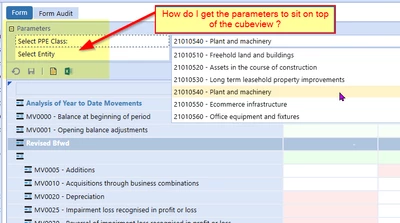
How do I show parameter options in a cubeview display ( see example screenshot )
Hi,
So I have inherited a OneStream application and although I know how to build cubeviews, I cannot work out how to replicate the feature shown below on some of my existing application's cubeviews. The cubeview "parent" is referencing a row template to provide the flow lines and a column template which holds the parameter elements to select in this example the PPE Class.
I am trying to recreate this layout, but try as I might, on running the cubeview it just serves a popup for the user to select the parameters, rather than docking it to the cubeview output.
What do i need to select, or where do i need to place these various elements in order for me to be able to dock it like this screenshot.
Thanks
Mark