

OneStream Employee
November 9, 2021
Solved

How do I set up drill down for relational sources in BI Viewer?

  • November 9, 2021
  • 3 replies
  • 0 views
How do I set up drill down for relational sources in BI Viewer?
Best answer by Franz

Setting up drill down for relational sources in BI Viewer is a two-step process.

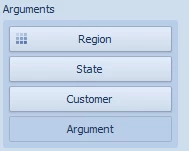
First, you must add all of the dimensional levels you wish to the columns, rows, or arguments of the visualization on which you wish to drill down. Put the starting level for your drill down that the top and the lower levels beneath it, consecutively. An example can be seen here:
Drill.PNG

In this example, our drill path starts at Region which drills to State and then finally to Customer.

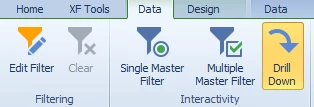
The second part of setting up drill-down is the enable drill down thru in the visualization section of the data menu of your visualization. 
Int.PNG

With these steps completed, your visualization is now drill-down enabled.


3 replies

FranzOneStream EmployeeAuthorAnswer
OneStream Employee
November 9, 2021

Setting up drill down for relational sources in BI Viewer is a two-step process.

First, you must add all of the dimensional levels you wish to the columns, rows, or arguments of the visualization on which you wish to drill down. Put the starting level for your drill down that the top and the lower levels beneath it, consecutively. An example can be seen here:
Drill.PNG

In this example, our drill path starts at Region which drills to State and then finally to Customer.

The second part of setting up drill-down is the enable drill down thru in the visualization section of the data menu of your visualization. 

Int.PNG

With these steps completed, your visualization is now drill-down enabled.


OneStream Employee
November 10, 2021

Thanks Franz, can you please mark the asnwer as correct since this is the right way of enabling drill donw in a bi viewer?

Newcomer
February 11, 2022

Hi Franz,

just checking, are you saying that you can drill down on a single dimension this way? Because I can only add a single dimension and....that's it (unless I'm overlooking something).

FranzOneStream EmployeeAuthor
OneStream Employee
February 11, 2022

No. You are drilling on all of the dimensions that are included in the arguments pane. These arguments could include fields from any number of dimensions (e.g. state, customer, product.)