
Newcomer
May 5, 2023

How can we show commas as the thousand separator in a numeric Table View column

  • May 5, 2023
  • 3 replies
  • 0 views

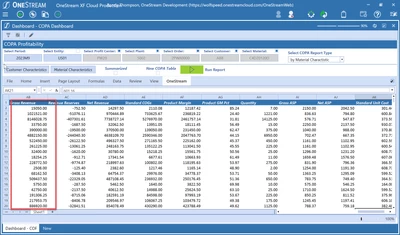
We are trying to format numeric columns in a Table View but haven't been successful. The numeric columns are currently appearing as 999999.99 instead of the desired 99,999.99. Are Table View currently looks like this:
RandyThompson_0-1683290461604.png

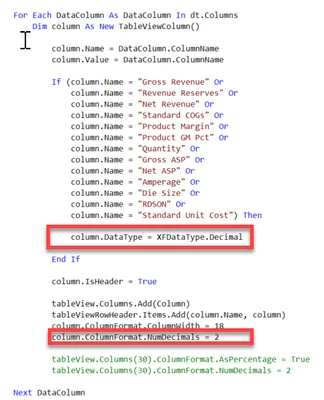
The Spreadsheet Table View rule is defining the numeric columns here:

sql.AppendLine( ",FORMAT(SUM(ISNULL([V4],'0')),'N2','en-us') As [Gross Revenue]")
RandyThompson_1-1683290513645.png

Thanks

3 replies

RobbSalzmann
Legend
May 5, 2023

Could you try formatting the number in your sql query?

SELECT FORMAT(SomeNumericColumn,'#,0.00') from SOME_TABLE

Newcomer
May 5, 2023

I tried that and it didn't work. Table View seems to be ignoring the SQL formatting and applying their formatting based on the table view column definition.

Newcomer
May 5, 2023

Randy, you will have to get rid of the column format and use the populate from data table option with the keep format from data boolean.

Newcomer
May 5, 2023

Thanks, Celvin. Unfortunately I can't find any documentation on this. Can you share a snippet of code of how to use the populate from data table. Thanks.

OneStream Employee
May 9, 2023

Didn't test this but it should work.

' assuming yourDataTable will have been obtained already
Dim includeColHeaderRow as Boolean = True
Dim useDataTypes as Boolean = True  ' try switching this on/off to compare results
args.TableView.PopulateFromDataTable(dataTable, includeColHeaderRow, useDataTypes)
return args.TableView