Newcomer
May 24, 2023
Solved

How can we make header as bold and increase the header size in both report & excel?

  • May 24, 2023
  • 1 reply
  • 0 views

Dear Community, 

We have a requirement to make all the headers in report as well as in excel to make it bold and to increase the size. Here, I wrote a Business Rule function in Cube View Extender to make the change. But, I see it's getting reflected for only one of the headers in the report. Here, I'm attaching the images for the reference. Any solutions to this are really appreciated. Thanks. 

Nitishkrish16_0-1684910902001.png -- This is what I have given in the report header. 



Nitishkrish16_2-1684911080141.png -- And this is the output when generating the report. This bold needs to be applied to all the headers given here. 

 

Nitishkrish16_3-1684911140417.png -- This is the output when I'm viewing it in the excel format. No changes are seen here. 
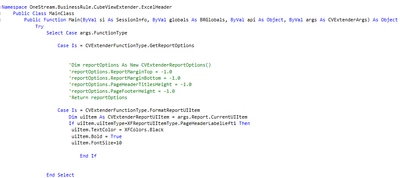
 

Nitishkrish16_4-1684911225252.png  -- Cube View Extender Business Rule which I used. 


Best answer by OS_Pizza

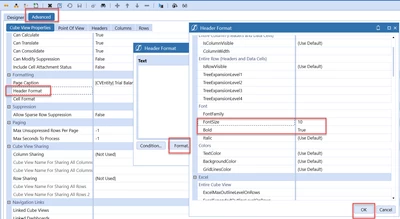
You can update the format directly in the cube view editor. Please check the screenshot below and the result -

OS_Pizza_0-1684916504616.png

Result

OS_Pizza_1-1684916564305.png

(OR)

If you want to use the business rule then you have to add the property for l2,l3 and so on. Check below

OS_Pizza_0-1684917711845.png


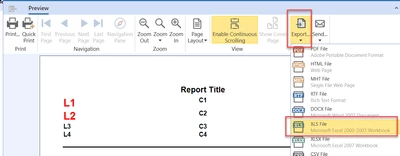
The difference in Excel v/s report is because you have extracted the CubeView in excel directly. Open first in Report and then do an Export -> XLS

OS_Pizza_1-1684917837263.png


1 reply

OS_PizzaAnswer
Veteran
May 24, 2023

You can update the format directly in the cube view editor. Please check the screenshot below and the result -

OS_Pizza_0-1684916504616.png

Result

OS_Pizza_1-1684916564305.png

(OR)

If you want to use the business rule then you have to add the property for l2,l3 and so on. Check below

OS_Pizza_0-1684917711845.png


The difference in Excel v/s report is because you have extracted the CubeView in excel directly. Open first in Report and then do an Export -> XLS

OS_Pizza_1-1684917837263.png


Newcomer
May 24, 2023

Thanks a lot for your response. The Condition needs to be applied in the report/excel headers. But, it's getting applied for all the row/column headers. Please check the below image. Thank you again for your time to get the solution. 

Nitishkrish16_2-1684917903963.png


Veteran
May 24, 2023

Revert the changes in the Cube View Header format and use the logic in the business rule ( Check the updated comment ).