Newcomer
December 1, 2021

Hide repeated text in CV excel

  • December 1, 2021
  • 3 replies
  • 2 views

Source: OneStream Champions


Hi, is there a way to hide/format these repeated text in CV excel settings? I would like for e.g. “ProSolutions” to show once for every stats section.
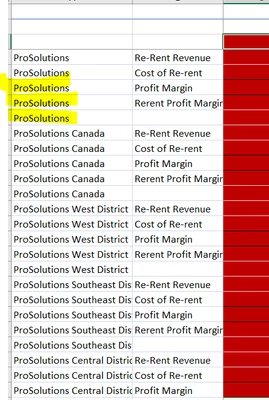
 

Mustafa_A_0-1638391863205.png


image.png444×661 8.47 KB


Thank you!

3 replies

Member
December 1, 2021

I recently asked a very similar question to OneStream on behalf of a client and received the following suggestion that may or may not work for you:

  1. Apply a conditional formatting to the row header (‘Gold’ is the member name of the first item in row expansion 2 in my report)
    RachealCrowder_0-1638392011695.png


  2. The cube view in data explorer (you can see gold is the first member):
    RachealCrowder_1-1638392011558.png


  3. Run to excel – you can see these items are white:
    RachealCrowder_2-1638392011768.png


Given there isn’t a true way to suppress the headers, I would encourage you to submit an enhancement request on this topic.

Newcomer
December 1, 2021

You may also find the color “transparent” to be more universal. I’ve had success using that to hide text, and it doesn’t care what color it’s up against.

Newcomer
December 1, 2021

Thank you
