
Newcomer
Jun 16, 2023 8:26 AM UTC

GetDataCell in cube views of members based on criteria Text

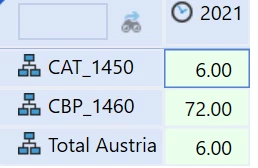
Hi, there is a way to get the sum of the values of all the members that I filter with the text3? for example text3='Austria'

In this case in Row1, I have E#Entity.Base.Where(Text3 = 'Austria'), which identify two entities, and in Row2 GetDataCell(CVR(Row1)):Name(Total Austria), but it doesn't work.
osanalyst_1-1686903773190.png


5 replies

Member
Jun 16, 2023 1:34 PM UTC

I think in this instance, you would be best advised to use an XFBR rule to solve this challenge.

You can then specify the E#Entity.Base.Where(Text3 = 'Austria') as a parameter to pass into the XFBR, and then within the XFBR you can build a GetDataCell string that you return to the MemberFilter in the CV. In the rule you would create a Member List using the filter, and then cycle through each member in the list to build the string, adding up all the members.

XFBR(GetDataCellUsingFilter,Filter=E#Entity.Base.Where(Text3 = 'Austria'))

I believe there is a rule out there already, written by Nick Kroppe, that does this.

Hope this helps!

Archetype

osanalystAuthor
Newcomer
Jun 16, 2023 1:43 PM UTC

I tried to use this business rule XFBR string but it doesn't work

Namespace OneStream.BusinessRule.DashboardStringFunction.CubeViewLists
Public Class MainClass
Public Function Main(ByVal si As SessionInfo, ByVal globals As BRGlobals, ByVal api As Object, ByVal args As DashboardStringFunctionArgs) As Object
Try
'-- Example Usage XFBR(CubeViewLists,GetSumMemberFormula,DimName=[|WFEntityDim|],MemberFilter=[])
If args.FunctionName.XFEqualsIgnoreCase("GetSumMemberFormula") Then
Dim strMbrFilter As String = args.NameValuePairs("MemberFilter")
Dim strDimName As String = args.NameValuePairs("DimName")

Dim dpk As DimPk = BRApi.Finance.Dim.GetDimPk(si, strDimName)
If dpk Is Nothing Then
Throw New XFException(si, "Error, specified dimension does not exist", strDimName)
Else
Dim lstMI As List(Of MemberInfo) = brapi.Finance.Members.GetMembersUsingFilter(si, dpk, strMbrFilter, True )

Dim strList As String = String.Join(" + ", (From l In lstMI Select "E#[" & l.Member.Name & "]").ToArray())
Return strList
End If

End If

Return Nothing
Catch ex As Exception
Throw ErrorHandler.LogWrite(si, New XFException(si, ex))
End Try
End Function
End Class
End Namespace

Member
Jun 16, 2023 4:22 PM UTC

What error are you getting?

This code should work, it includes the GetDataCell and Name as an additional argument:

Namespace OneStream.BusinessRule.DashboardStringFunction.CubeViewLists
Public Class MainClass
Public Function Main(ByVal si As SessionInfo, ByVal globals As BRGlobals, ByVal api As Object, ByVal args As DashboardStringFunctionArgs) As Object
Try
                If args.FunctionName.XFEqualsIgnoreCase("GetSumMemberFormula") Then
                    Dim strMbrFilter As String = args.NameValuePairs("MemberFilter")
                    Dim strDimName As String = args.NameValuePairs("DimName")
                    Dim strName As String = args.NameValuePairs("Name")
 
                    Dim dpk As DimPk = BRApi.Finance.Dim.GetDimPk(si, strDimName)
                    If dpk Is Nothing Then
                        Throw New XFException(si, "Error, specified dimension does not exist", strDimName)
                    Else
                        Dim lstMI As List(Of MemberInfo) = BRApi.Finance.Members.GetMembersUsingFilter(si, dpk, strMbrFilter, True)
 
                        Dim strList As String = String.Join(" + ", (From l In lstMI Select "E#[" & l.Member.Name & "]").ToArray())
 
'XFBR(CubeViewLists,GetSumMemberFormula,DimName=[MainEntityDim],MemberFilter=[E#Legal_Consol.Base.Where(Text1 = 'Test')],Name=[Total])
                        Return $"GetDataCell({strList}):Name({strName})"
                    End If
                End If
 
Return Nothing
Catch ex As Exception
Throw ErrorHandler.LogWrite(si, New XFException(si, ex))
End Try
End Function
End Class
End Namespace
ChristianW
Employee - Advisor
Employee - Advisor
Jun 19, 2023 7:40 AM UTC

Hi osanalyst 

Can you please add this to Ideastream?

Thanks and cheers

Christian