
Newcomer
February 7, 2022
Solved

GetData CVC function for rows

  • February 7, 2022
  • 3 replies
  • 0 views

Hi All,

Do we have a function to get data from a row within CV? For e.g. GetDataCell(CVC(Rental Revenue) / CVC(Fleet Actual))
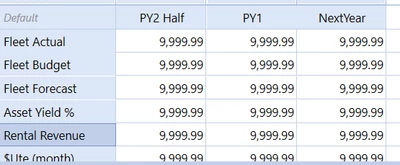
Mustafa_A_0-1644254214752.png


I tried using this method but keep getting a syntax error. Any suggestions in the right directions will be appreciated.  Thanks!


Best,

Mustafa
 

Best answer by LeeB

Hi,


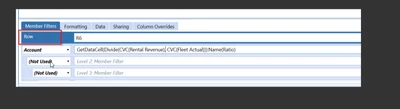
Just spotted you are using Column math in a Row.

LeeBown_0-1644259511581.png


You need:  GetDataCell(Divide(CVR(Rental Revenue), CVR(Fleet Actual)))

Also, consider creating a member and writing a Dynamic calculation if this is a frequently used KPI.


Lee

3 replies

Contributor
February 7, 2022

Hi Mustafa,

Try:

GetDataCell(Divide(CVC(Col3), CVC(Col2))):Name(Ratio)


Lee


Newcomer
February 7, 2022

Hi LeeB 

I'm getting this error. Tried playing around with brackets and comma, but the error message still appears. 

Mustafa_A_0-1644258768727.png


Mustafa_A_1-1644258903434.png


LeeBAnswer
Contributor
February 7, 2022

Hi,


Just spotted you are using Column math in a Row.

LeeBown_0-1644259511581.png


You need:  GetDataCell(Divide(CVR(Rental Revenue), CVR(Fleet Actual)))

Also, consider creating a member and writing a Dynamic calculation if this is a frequently used KPI.


Lee

Newcomer
November 13, 2022

GetdataCell_Divide.PNGGetdataCell_Divide_Error.PNG

Hi,

Can anyone help me please what i am doing wrong here. I want to use CVC where i want to divide Variancedollar by MTDBUDGET. Going by the above script its look like the syntax is correct but i am getting the Error.

Please help..Sandeep S


Newcomer
November 13, 2022

Hi

what i figured out is probably the problem was not in the syntax rather using a name "Variance"  as a column name. the moment i changed the column name from VarianceDollar to COL4 ..it started working. Not sure why but..atleast its working but still interested to know the root reason.