
Contributor
October 9, 2023

Excel XFGetCell refresh is not working and data cells showing #NAME?

  • October 9, 2023
  • 2 replies
  • 0 views

Hi All, 

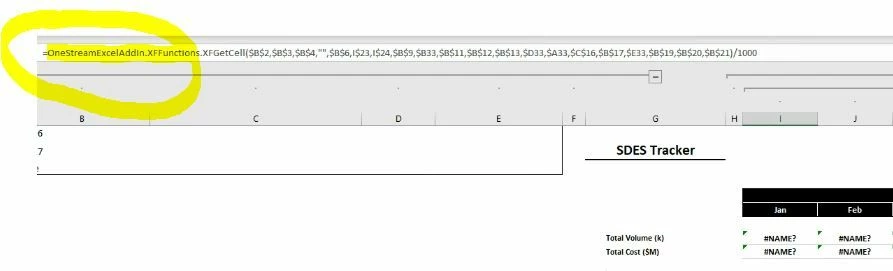
We are using XFGetCell's all the time in excel and one of the user reinstalled MS Office recently and he started facing issues XFGetCell. Please see screenshot below. 

XFGetCell function is defaulting to OneStreamExcelAddIn.XFFunctions.XFGetCell and this is causing refresh issue. If I try to remove the highlighted part the sheets are working fine. Any suggestions will be appreciated ? 
Excel-AddIn Issue.JPG

Thanks 
Sridhar 

2 replies

OneStream Employee
October 10, 2023

You should check with Support for this kind of thing. I suspect the issue is sharing the file with people having the add-in installed in different places.

Sridhar_MAuthor
Contributor
October 10, 2023

Thank you JackLacava
I'll open a ticket with support. Installation looks okay but I'll keep this post updated when I find resolution from OneStream.  

Contributor
November 10, 2023

Hi Sridhar, did support get back with you on this? We are getting the same thing at a client. They are on a shared drive so like Jack suggested I believe thats it but curious on if they told you a solution?

Contributor
November 10, 2023

Thanks Sridhar! Ill give this a shot