
Contributor
January 10, 2022

Excel VBA automation - Refresh Workbook function

  • January 10, 2022
  • 3 replies
  • 0 views

SOURCE: CHAMPIONS

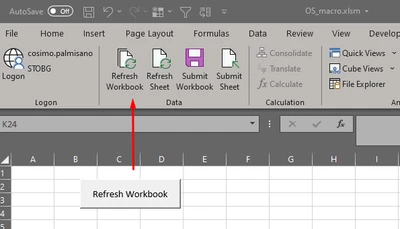
Does anyone know if we can call the Refresh Workbook function using VBA? I’m looking to introduce a button on worksheets that performs the Refresh Workbook option that’s located on the OneStream XF ribbon.
Cosimo_0-1641844028987.png


3 replies

Newcomer
January 10, 2022

Hi Cosimo,

There is a OS Knowledge Base article about this: KB0010071

https://onestreamsoftware.service-now.com/sp/?sys_kb_id=09389b291be7601099ce86e1604bcb5d&id=kb_article_view&sysparm_rank=1&sysparm_tsqueryId=9ec76c471b6a381099ce86e1604bcb0c

In practice, it looks something like this:

Sub RefreshXFFunctions()
Set XFAddIn = application.COMAddIns("OneStreamExcelAddIn")
If Not XFAddIn Is Nothing Then
    If Not XFAddIn.Object Is Nothing Then
        Call XFAddIn.Object.RefreshXFFunctions
    End If
End If

End Sub

or

Sub RefreshCubeViews()
    Set XFAddIn = application.COMAddIns("OneStreamExcelAddIn")
    If Not XFAddIn Is Nothing Then
        If Not XFAddIn.Object Is Nothing Then
            Call XFAddIn.Object.RefreshCubeViews
        End If
    End If
End Sub
CosimoAuthor
Contributor
January 10, 2022

Thank Phil. This is exactly what I was looking for. Interesting to note that I had to run 3 functions to simulate “Refresh Workbook”:

> Sub Refresh_Workbook()
>     Set XFAddin = Application.COMAddIns("OneStreamExcelAddIn")
>     If Not XFAddin Is Nothing Then
>         If Not XFAddin.Object Is Nothing Then
>             Call XFAddin.Object.RefreshXFFunctions
>             Call XFAddin.Object.RefreshQuickViews
>             Call XFAddin.Object.RefreshCubeViews
>         End If
>     End If
> End Sub
 
Contributor
March 30, 2022

Thanks Cosimo for this extra info, also I found that in the Preferences... Enable Macros for XF Event Processing needed to be set to FALSE for it to work.

MarkHoughton_0-1648634302269.png


Veteran
January 25, 2022

With an Okta user you could try the following:

' Set Excel Addin object
Set xfAddin = Application.COMAddIns("OneStreamExcelAddIn").Object

'OneStream Web URL
url = "https://server/OneStreamWeb"

'okta user credentials
oktaUsername = "enter okta username"
oktaPassword = "enter okta password"

' app name
app = "enter application name"

' get SSO Token
ssoToken = xfAddin.ProcessSSOAuthenticationAndCreateToken(url, oktaUsername, oktaPassword)

' display token, only use for validating, if no token exists then login will not be successful
MsgBox ssoToken

' Get user from SSO token
user = xfAddin.GetXFUserNameFromSSOToken(ssoToken)

' log into application using token
isLoggedIn = xfAddin.LogonAndOpenApplication(url, user, ssoToken, app)

If isLoggedIn Then

MsgBox ("Logged into OneStream")

Refresh = xfAddin.RefreshQuickViewsForActiveWorksheet()

xfAddin.Logoff

Else
MsgBox ("Problem with login")
End If

Contributor
March 30, 2022

Thanks for this very useful piece of code, it certainly works for my OKTA sign in.

August 2, 2022

any example for PingFed sing in?

Veteran
September 2, 2022

Can you describe your requirement in detail?

October 5, 2022

I want to automate OneStream refresh, but for authentication we use PingFed.