
Excel Addin- Unable to log on.
I installed the wrong Excel add-in on my new computer (7.0.1 when our tenant is only compatible with 6.6.0 or lower). Now, when I open Excel and try to logon, I get the below error message. I have figured out that if I manually disable the OneStreamExcelAddin.XFFunctions and completely close out of Excel then, when I restart it, I'm able to logon. The annoying part is, if I forget to disable it and close out of Excel, the next time I use Excel I have to go through that whole process of saving and closing all my workbooks, disabling the add-in, restarting Excel, just to use the add-in.
I'm thinking there must be something leftover from the previous install that is causing this and I've tried to completely wipe everything from the initial install before installing the correct version but to no avail. Has anyone else experienced this and know what steps I can take to remediate? (I should also note that I made the same mistake on my old computer and had the same issue, so this does not just seem like a one-off issue with a specific PC)
Thanks in advance!
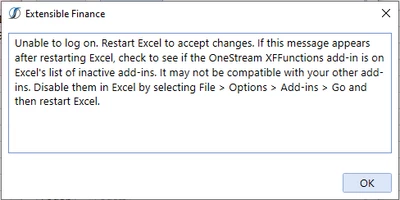
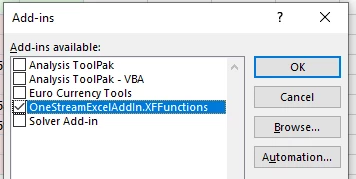
(Will leave the text of the error here for anyone else who might be searching for this error message)
"Unable to log on. Restart Excel to accept changes. If this message appears after restarting Excel, check to see if the OneStream XFFunctions add-in is on Excel's list of inactive add-ins. It may not be compatible with your other add-ins. Disable them in Excel by selecting File > Options > Add-ins > Go and then restart Excel."