Hey cap08, have you seen the Task Activity Type filter list? This shows a few different Excel task types, such as Get Excel Data, Export Cube View to Excel, and Quick View.
The Design & Reference Guide has a https://documentation.onestream.com/docs/Content/Design%20and%20Reference/Logging/Enhancing%20Task%20Activity/8.01B%20Task%20Actvity%20in%20Excel.html?Highlight=task%20activity%20excelsection, which suggests that Task Activity in Excel is stored in the same log table, which can be found under the System tab.
You can cancel a long-running cube view in Excel Add-In. You do not have to be logged into the Windows application. The Task Activity in Excel Add-In allows you to cancel your task. If you are an Administrator, you can cancel another user's running task. You can access the Task Activity icon in the Excel Add-In in the Tasks section in the OneStream ribbon.
Importantly, you and your team may find Logon activity and other Audit data more suitable.
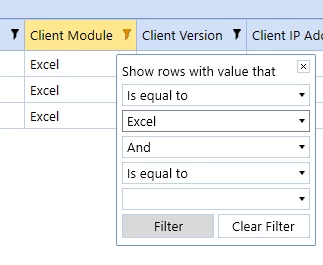
From the System tab, visit the Logon Activity page and filter for the Client Module: Excel.
From our https://solutionexchange.onestream.com/, download the https://documentation.onestream.com/docs/Content/ONC/Overview.htmlsolution. ONC is a new pack of various helpful audit reports.
You may also https://onestreamsoftware.service-now.com/support?id=sc_cat_item&sys_id=f4f36ae51b5c3950987cc88b234bcbad&sysparm_category=65c51c361bfb6d10987cc88b234bcb04&catalog_id=-1, and the team will route your case to the appropriate resource for additional help!
