we have a few U8 members - vs Budget, vs PY etc. and are paired with V#VarianceExplanation member in our cube views for the users to enter commentary. We now have a requirement to present all that commentary in a grid view or some sort of report output rather than just the cube view.
Is it even possible to bring in members like VarianceExplanation, Annotation etc. into OneStream’s reporting? I tried building a simple BIViewer grid with no luck, so any inputs are highly appreciated.
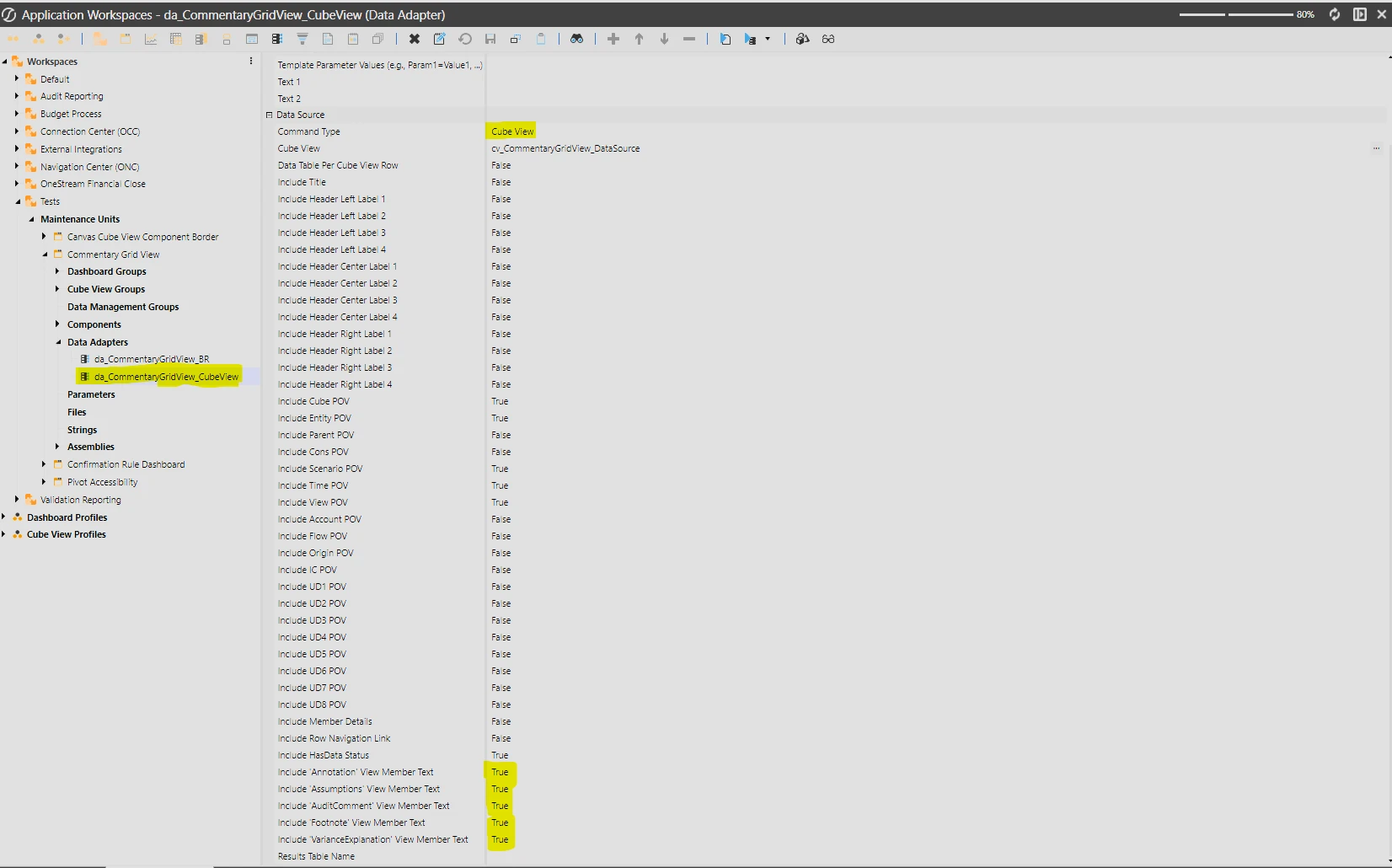
If you are looking to target a specific POV in your grid view, I would try building a cube view that exposes these annotations and hook it to a data adapter. The command type “Cube View” has options to expose any of the annotations associated with values you expose within the cube view.
I find the table schema that the “Cube View” method command returns quite hard to tidy up into something presentable however.
If you are comfortable with dashboard data set business rules you could directly retrieve all commentary entered in bulk using the method “BRApi.Finance.Data.GetDataAttachments”.
I wrote the script below to hopefully get you started. It pulls all commentary entered for a specific scenario, time and annotation view.
Note that the retrieval of the data cell amount per item is not going to be very efficient for large data sets.
Dim amountViewName As String = args.NameValuePairs.XFGetValue("View", "YTD") ' Used to retrieve the data cell amount Dim commentaryViewName As String = args.NameValuePairs.XFGetValue("CommentaryView", "VarianceExplanation") ' Used to retreive the commentary Dim scenarioName As String = args.NameValuePairs.XFGetValue("Scenario", "Actual") Dim timeName As String = args.NameValuePairs.XFGetValue("Time", "2027M1")
Dim commentaryViewId As Integer = BRApi.Finance.Members.GetMemberId(si, DimTypeId.View, commentaryViewName) Dim attachmentType As DataAttachmentType = DataAttachmentTypeHelper.GetDataAttachmentTypeForViewMember(commentaryViewId)
' Build this member filter from member names passed as arguments ' for a more dynamic retrieval. Dim memberFilter As String = $"S#[{scenarioName}]:V#[{commentaryViewName}]:T#[{timeName}]"
Dim dataAttachments As DataAttachmentList = BRApi.Finance.Data.GetDataAttachments( si, memberFilter, False )
For Each attachment As DataAttachment In dataAttachments.Items ' This attachment type filter may not be required due to the flow in the member script, but added it just in case. If attachment.AttachmentType <> attachmentType Then Continue For
Dim amountMemberScriptBuilder As New MemberScriptBuilder( attachment.Cube, attachment.Entity, attachment.Parent, attachment.Cons, attachment.Scenario, attachment.Time, amountViewName, attachment.Account, attachment.Flow, attachment.Origin, attachment.IC, attachment.UD1, attachment.UD2, attachment.UD3, attachment.UD4, attachment.UD5, attachment.UD6, attachment.UD7, attachment.UD8 ) Dim amount As Decimal = BRApi.Finance.Data.GetDataCellUsingMemberScript( si, attachment.Cube, amountMemberScriptBuilder.GetMemberScript() ).DataCellEx.DataCell.CellAmount
If you are looking to target a specific POV in your grid view, I would try building a cube view that exposes these annotations and hook it to a data adapter. The command type “Cube View” has options to expose any of the annotations associated with values you expose within the cube view.
I find the table schema that the “Cube View” method command returns quite hard to tidy up into something presentable however.
If you are comfortable with dashboard data set business rules you could directly retrieve all commentary entered in bulk using the method “BRApi.Finance.Data.GetDataAttachments”.
I wrote the script below to hopefully get you started. It pulls all commentary entered for a specific scenario, time and annotation view.
Note that the retrieval of the data cell amount per item is not going to be very efficient for large data sets.
Dim amountViewName As String = args.NameValuePairs.XFGetValue("View", "YTD") ' Used to retrieve the data cell amount Dim commentaryViewName As String = args.NameValuePairs.XFGetValue("CommentaryView", "VarianceExplanation") ' Used to retreive the commentary Dim scenarioName As String = args.NameValuePairs.XFGetValue("Scenario", "Actual") Dim timeName As String = args.NameValuePairs.XFGetValue("Time", "2027M1")
Dim commentaryViewId As Integer = BRApi.Finance.Members.GetMemberId(si, DimTypeId.View, commentaryViewName) Dim attachmentType As DataAttachmentType = DataAttachmentTypeHelper.GetDataAttachmentTypeForViewMember(commentaryViewId)
' Build this member filter from member names passed as arguments ' for a more dynamic retrieval. Dim memberFilter As String = $"S#[{scenarioName}]:V#[{commentaryViewName}]:T#[{timeName}]"
Dim dataAttachments As DataAttachmentList = BRApi.Finance.Data.GetDataAttachments( si, memberFilter, False )
For Each attachment As DataAttachment In dataAttachments.Items ' This attachment type filter may not be required due to the flow in the member script, but added it just in case. If attachment.AttachmentType <> attachmentType Then Continue For
Dim amountMemberScriptBuilder As New MemberScriptBuilder( attachment.Cube, attachment.Entity, attachment.Parent, attachment.Cons, attachment.Scenario, attachment.Time, amountViewName, attachment.Account, attachment.Flow, attachment.Origin, attachment.IC, attachment.UD1, attachment.UD2, attachment.UD3, attachment.UD4, attachment.UD5, attachment.UD6, attachment.UD7, attachment.UD8 ) Dim amount As Decimal = BRApi.Finance.Data.GetDataCellUsingMemberScript( si, attachment.Cube, amountMemberScriptBuilder.GetMemberScript() ).DataCellEx.DataCell.CellAmount
Stuart - Creating a simple data adapter with Cube View command type worked like a charm for what we are looking. I’ll still hold on to the Business rule recommendation for potential future use cases. Thank you again!