
Newcomer
July 10, 2024
Solved

Date Format Change in Report Footer via Cube View Extender + Display Username in Report Footer

  • July 10, 2024
  • 3 replies
  • 3 views

Does anyone know the BR to change the date format of the Cube view Report footer from ("MM/dd/yyyy h:mm:ss tt") to ("dd/MM/yyyy h:mm:ss tt") via Business Rule Cube view extender?

Is there also a rule to show the Username on the Report footer? Would be ideal to show it in the center of the report footer.


Thanks
 

Best answer by T_Kress

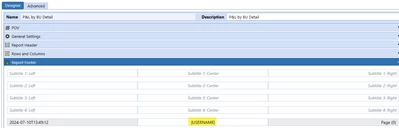
For the user name, you can use the sub var |UserName| in the report footer like this:

T_Kress_0-1720641150850.png

This will come out on the PDF report.  

For the date format still researching.

3 replies

T_Kress
T_KressAnswer
Contributor
July 10, 2024

For the user name, you can use the sub var |UserName| in the report footer like this:

T_Kress_0-1720641150850.png

This will come out on the PDF report.  

For the date format still researching.

T_Kress
Contributor
July 10, 2024

There is an enhancement request to have this date footer on reports work off the user's culture code.  It is in Idea Stream here:  (2) JIRA Ticket: PF-4353 (onestreamsoftware.com)

But if you search in One Community you can find an example here:  How to get Date, Time and Time Zone in Report Footer using Cube View Extender Rule. - OneStream Community (onestreamsoftware.com)

AlperenPAuthor
Newcomer
July 11, 2024

The second solution didn't work in the Cube view Extender Rule.

I need the complete Business Rules, which is used within the CV Extender Inline Formula and starts with:

Select Case args.FunctionType

Case Is = CVExtenderFunctionType.FormatReportUIItem

Dim uiItem As CVExtenderReportUIItem = args.Report.CurrentUIItem

If uiItem.UIItemType = XFReportUIItemType.PageFooterDate Then....

Thanks