


Employee - Guide
Dec 6, 2022 5:44 PM UTC

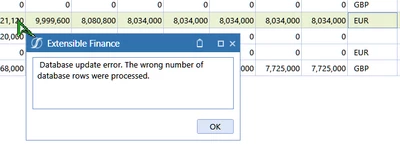
Database update error. The wrong number of database rows were processed.

Hello !

I'm facing an issue where I want to change the value in one of the cell of an SQL table editor.

The row is already there (generated via business rule), but I just want to edit a cell of this row. When I hit save, I get the message "Database update error. The wrong number of database rows were processed".

It only happens with this row that has been inserted by a business rule. I am able to change the value of all rows except this one. Also, I don't have any business rule running when I save my datatable.

Strangely, I get the same error message if I try to delete the row ...
 

Sergey_0-1670348645050.png

How to solve this situation ?


Regards,

5 replies

Employee - Sage
Dec 7, 2022 11:32 AM UTC

The rule might have left a row lock...? If you're working locally, you could try rebooting the whole environment (Onestream and SQLServer). If not, sounds like one for Support to look into.

SergeyEmployee - GuideAuthor
Employee - Guide
Dec 10, 2022 10:42 AM UTC

Thanks Jack, you're awesome !

The error was because there was no primary keys, I have added an "ID" column as the first column on my datatable, and now I don't have this issue anymore. Something to keep in mind when working on data table !

Many thanks !

Newcomer
Mar 8, 2024 6:34 PM UTC

Sergey, Jack,

is there a workaround if the table does not have a PK? I don't have the privilege to add one. 

Employee - Sage
Mar 9, 2024 10:13 AM UTC

In theory you could add one dynamically in the rules that retrieve and save data, although it's a lot of work.

One thing to note is that primary keys are only mentioned in documentation in relation to multi-selection; if you have that enabled, you could try renouncing that and seeing if it removes the problem.

If that's still not working, the only way is to contact Support and/or eventually file on IdeaStream.

Newcomer
Jul 31, 2024 4:29 PM UTC

Hi guys,

I have the sam problem, I add a primary key, but nothing change.

If I save changes only for one row the error doesn't appear, if I add more than onerow, the error continues to be present.