Newcomer
Aug 24, 2023 1:18 PM UTC
Solved

Dashboard Button Image change

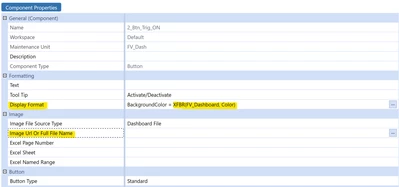
I have a dashboard with a button component in which I have a XFBR String which alternates between two colors for the button's image background when clicked.

Similary, I would like to be able to alternate between two images for my button when clicked. Is this possible with a XFBR String at all ? I thought I could return the image's file name with a XFBR String under Image URL Or Full File Name 
dbug_1-1692882923127.png

 or can XFBR Strings only be used under Display Format ?
Employee - Mentor
Aug 24, 2023 6:41 PM UTC

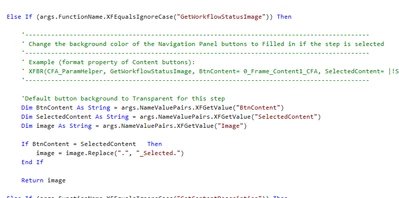
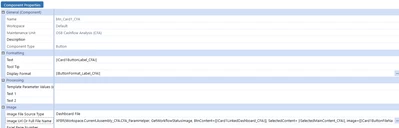
You can use an XFBRString to swap the image:

EricOsmanski_0-1692902451702.pngEricOsmanski_1-1692902496829.png


5 replies

RobbSalzmann
Employee - Advisor
Employee - Advisor
Aug 24, 2023 2:07 PM UTC

One way to go about this is to create two identical embedded dashboards each with a button having a different image.
in each button, if this is a toggle thing then make the other button's dashboard visible and its dashboard hidden.

You can use also BR logic, and a parameter in the button or dashboard properties.

RobbSalzmann_0-1692886018487.png


Employee - Mentor
Aug 24, 2023 6:41 PM UTC

You can use an XFBRString to swap the image:

EricOsmanski_0-1692902451702.pngEricOsmanski_1-1692902496829.png


dbugAuthor
Newcomer
Aug 25, 2023 8:22 AM UTC

Hi Eric,

Thanks for your solution! I've tried something similar but for some reason I'm always getting the below error:

dbug_0-1692950897770.png

For my set up, I made a parameter to store the image and use it on my button via a XFBR String:

dbug_2-1692951089167.png


I have set up the button as below:

dbug_4-1692951368377.png


My BR should simply return the literal value of the parameter.

dbug_1-1692950988072.png

Employee - Sage
Aug 25, 2023 10:43 AM UTC

Try placing square brackets around your parameter, i.e. image=[|!Btn_Image!|]

dbugAuthor
Newcomer
Aug 25, 2023 12:25 PM UTC

Thanks everyone - EricOsmanski 's method worked fine, it seems that I was pointing to an incorrect/non-existant file, hence the "key was not present in dictionary" error