
Newcomer
January 16, 2023
Solved

Cubeviews - Add blanks between Member expansions

  • January 16, 2023
  • 2 replies
  • 0 views

Hello,

I hope you're all doing well, this is my first time posting in the forum.

I recently built a cubeview that contains one Row, I was wondering if there is a way to automatically generate blanks after each member - in my case after each Entity of the hierarchy - and considering that i have multiple member expansions.

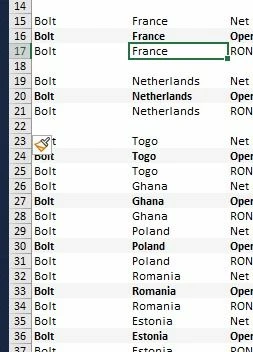
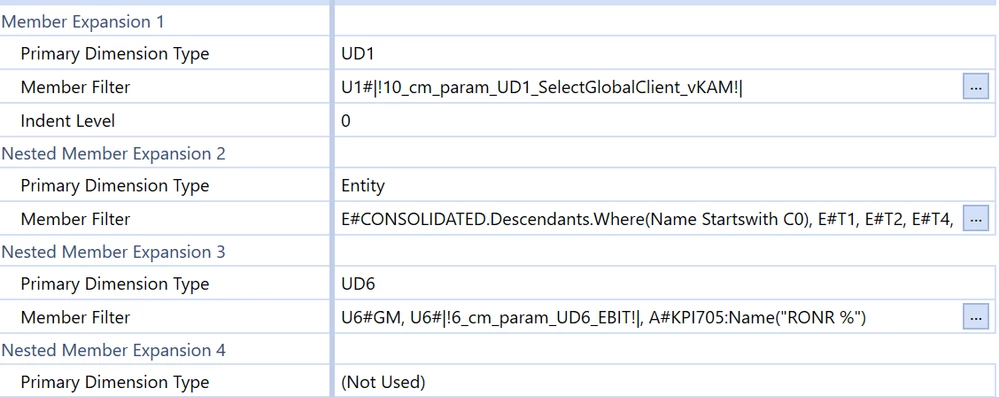
In order to clarify my request, please find below an overall of how do blanks should be automatically generated (1st Screenshot), you will also find a screenshot of the members used in my cubeview.

Thanks in advance, wishing you all a blessed day
WhatsApp Image 2023-01-16 at 2.33.59 PM.jpegmember expansions.png

Best answer by JackLacava

Not that I'm aware. You could maybe do it in actual reports, with Cube View Extenders, but not in Excel as far as I'm aware. The best i can think of is writing custom member list with some dummy "blank" member, then have a conditional format that will paint them "white on white" - but again, chances are it doesn't work when exported to Excel.

Obviously it works if you simply create multiple rows, one for each entity, and put blank rows inbetween.

2 replies

OneStream Employee
January 17, 2023

Not that I'm aware. You could maybe do it in actual reports, with Cube View Extenders, but not in Excel as far as I'm aware. The best i can think of is writing custom member list with some dummy "blank" member, then have a conditional format that will paint them "white on white" - but again, chances are it doesn't work when exported to Excel.

Obviously it works if you simply create multiple rows, one for each entity, and put blank rows inbetween.

ZakariaAuthor
Newcomer
January 19, 2023

Thank you Jack for your input, i came up with the same solution : by creating dummy "blank" rows  (formatting them white on white), that shares the same member expansion as my entity rows, so as entitys with nodata or zeros gets suppressed alongside their blanks by doing so i managed to also avoid back-to-back blanks