Contributor
June 23, 2022
Solved

Cubeview Underline last expanded member before totals

  • June 23, 2022
  • 1 reply
  • 0 views

This seems very standard, so I have to be missing something.  I have the row filter on a Cubeview "A#6020.TreeDescendantsInclusiveR".  6020 is the total line for all the single level descendants.  How do I get only the last descendant to be underlined in the report before the Total line of 6020?

Best answer by ChristianW

So my original row I'll have to break into two rows, first being A#6020.Treedescendants, and the second being A#6020 with the topline?  Worst part is in this case I have around 20 accounts, so that will be another 20 rows.


If it is for reports, you can use the execute cubeview extender inline formula:
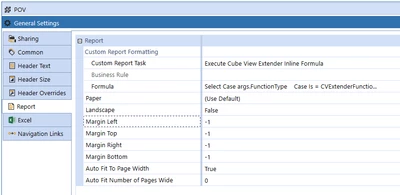
ChristianW_0-1656413378974.png

your sample would look similar to this:

Select Case args.FunctionType
	
	Case Is = CVExtenderFunctionType.GetReportOptions
		'Dim reportOptions As New CVExtenderReportOptions()
		'reportOptions.ReportMarginTop = -1.0
		'reportOptions.ReportMarginBottom = -1.0
		'reportOptions.PageHeaderTitlesHeight = -1.0
		'reportOptions.PageFooterHeight = -1.0
		'Return reportOptions
	
	Case Is = CVExtenderFunctionType.FormatReportUIItem
		Dim uiItem As CVExtenderReportUIItem = args.Report.CurrentUIItem
		Dim dimPkObj As DimPk = BRApi.Finance.Dim.GetDimPk(si, "HoustonAccounts")
		
		Dim rowMemberId As Integer = uiItem.GetRowHeaderMemberId(0)
			
		If BRApi.Finance.Members.HasChildren(si, dimPkObj, rowMemberId)
			uiitem.BorderColor = XFColors.Blue
			uiitem.BorderLineStyle = XFReportLineStyle.Solid
			uiitem.BorderSides = XFSides.Top
			uiitem.BorderThickness = 1
		End If			
	
End Select
Return Nothing

1 reply

Contributor
June 24, 2022

Hey johnai67: a combination of conditional formatting logic can hopefully get the job done.

Something like the below, which will be entered on the Row component of the cube view, likely in both the Header Format and Cell Format.

If (RowE1IndentLevel = 0) Then
Bold = True
End If

The TreeDescendantsInclusiveR will keep the final member as indentation=0 which we can use for then denoting special formatting. Feel free to browse the other conditional methods that can be referenced.

That said, the full solution per your question (a line above this final row) feels bugged in my opinion.  It would be designated as such:

If (RowE1IndentLevel = 0) Then
Bold = True, ReportTopLine1Color = Black, ReportTopLine1Thickness = 1, ReportUseTopLine1 = True
End If

It correctly applies the bold, but incorrectly applies toplines to all member expansions.  I'm wondering if we can get someone like ChristianW to weigh in here.  Bug or incorrect syntax?

Cheers

-DB

OneStream Employee
June 27, 2022

Hi dp_pdx

I think you are right, this might be a bug, can you please report it to our support.

Thanks and cheers

Christian


johnal67Author
Contributor
June 27, 2022

So my original row I'll have to break into two rows, first being A#6020.Treedescendants, and the second being A#6020 with the topline?  Worst part is in this case I have around 20 accounts, so that will be another 20 rows.