
Newcomer
July 18, 2023

Cube View Variance Calculation Issue

  • July 18, 2023
  • 4 replies
  • 0 views

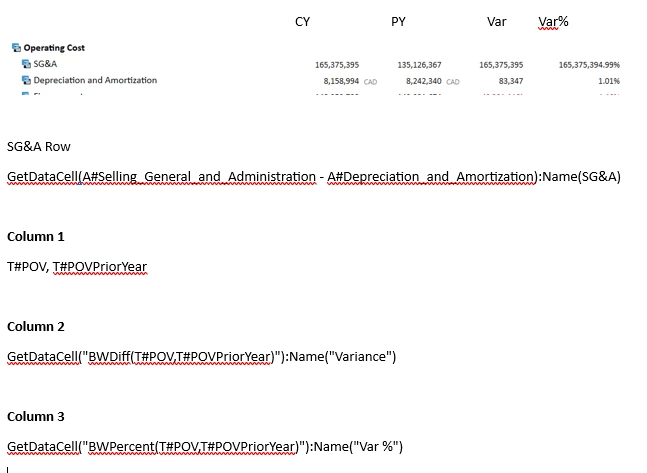
One row in my cube view is calculating a strange variance and variance %.

I am subtracting an account member from a parent account in my Row member filter builder.  Dep, & Amort is included in my SG&A parent and I want to report separately.  However, my variance column and Var % calculation is off.  It is the only row having this issue.  Also, I am not able to get the currency presented in the row.

Any suggestions are appreciated. 
 

Example CV.PNG

    4 replies

    Contributor
    July 18, 2023

    Hi Jennings,

    Can you check if your SG&A account is setup properly as it isn't showing currency also BW calculations consider account type during calculation. 

    Omkareshwar_0-1689686307600.png

    Thanks, Omkareshwar

    Archetype Consulting


    JenningsAuthor
    Newcomer
    July 18, 2023

    I appreciate the quick reply.  SG&A is setup as an expense. 


    Jennings_0-1689686830417.png


    OneStream Employee
    July 18, 2023

    You don't have double quotes around the GetDataCell and Name arguments, and that ampersand might be tripping things up. I'd try with quotes and without the &.

    If not that, it's probably a POV issue.

    JenningsAuthor
    Newcomer
    July 18, 2023

    Hi Jack, appreciate the response.  Thank you. 

    I believe that I made the updates you suggested but I'm still getting the same issues.


    Jennings_0-1689692853825.png


    Jennings_1-1689692935709.png


    OneStream Employee
    July 19, 2023

    Hi Denis, I think you are trying to achieve something like my example below:

    Compared to your settings, I have changed two things - I have two columns, one with CY and one with PY and I use CVC for the variance calculations (you can do the same using only one column but you need to use indexes).

    More important, I am using row overrides on the two calculated column (otherwise the row formula takes over)

    Noemi_0-1689772362068.png

    Please let me know if that works for you as well.

    Newcomer
    November 17, 2023

    Hi Naomi,

    I am having the same issue.  Would you mind posting your solution?

    OneStream Employee
    November 17, 2023

    Hi Julia, your issue is similar in a way that you have formulas in both the rows and the columns? And you would like the column calculation to override the row calculation?

    In this case, you can use a row override on your column like in my example:

    Noemi_0-1700211852711.png

    Please let me know if that helps.

    Thanks, 

    Noemi


    JenningsAuthor
    Newcomer
    July 20, 2023

    Thanks Noemi, this worked.