Newcomer
August 25, 2022
Solved

Cube View splitting quarters in columns

  • August 25, 2022
  • 3 replies
  • 0 views

Hello,


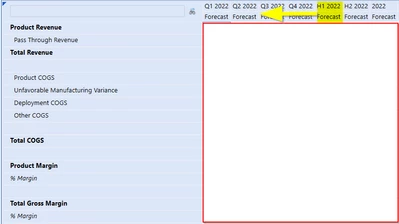
I have this Cube View that I created in which I have to move the half year (H1) column to be in between Q2 and Q3 in order to match the formatting of the report that I was given as the model.

I have attempted to make some changes to accomplish this but I have not been able to do so.

I am displaying the quarters as Time:T#WFYear.Quarters
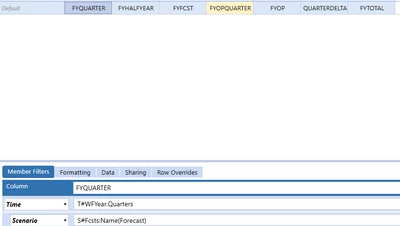
FM_0-1661448270852.png

FM_1-1661448320503.png


How can I accomplish this formatting goal?

Furthermore what is the synthax that would allow me to display a single quarter of my choosing? 


Thank you in advance for your time and cooperation!

Best answer by t_kaplanis


Since it seems you are using the WFYear, I would suggest using the substitution variable for that instead.

The column definition would be the following to move H1 between Q2 and Q3:

T#|WFYear|H1.Children, T#|WFYear|H1, T#|WFYear|H2.Children, T#|WFYear|H2

Use the same concept for selecting a quarter of your choosing:

T#|WFYear|Q3

This will give you Q3 of the workflow year.

These are quick ways of doing this, but this could be accomplished in many other ways.

3 replies

Newcomer
August 25, 2022


Since it seems you are using the WFYear, I would suggest using the substitution variable for that instead.

The column definition would be the following to move H1 between Q2 and Q3:

T#|WFYear|H1.Children, T#|WFYear|H1, T#|WFYear|H2.Children, T#|WFYear|H2

Use the same concept for selecting a quarter of your choosing:

T#|WFYear|Q3

This will give you Q3 of the workflow year.

These are quick ways of doing this, but this could be accomplished in many other ways.

aricgresko
Veteran
August 25, 2022

Try this. 

aricgresko_1-1661449801298.png

aricgresko_0-1661449780678.png

To select a single quarter, create a parameter and use that in your member filter.

aricgresko_2-1661450098732.pngaricgresko_3-1661450114463.png


FM26Author
Newcomer
August 25, 2022

Thank you to the both of you for taking the time to post and help. The solution worked out great!