
Newcomer
August 9, 2022

Cube View hiding column information

  • August 9, 2022
  • 2 replies
  • 0 views

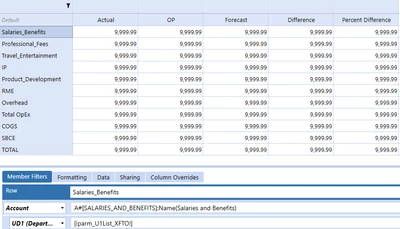
I have this Cube View that I have to format so that the highlighted department column information is hidden but I still need to show the user what department this report is for (there are several that can be picked when you run the cube view).

Any ideas on how I can go about these two issues?


Thank you for your time in advance!
FM_0-1660057057389.png


2 replies

aricgresko
Veteran
August 9, 2022

Couple options here.  I would put the department somewhere in the report header referencing the UD1 parameter in your screenshot.  For the rows of the report, try the following:

aricgresko_0-1660070168536.png


FM26Author
Newcomer
August 10, 2022

I am trying to move in the direction that you suggested but it is not working for me, when I run the cube view I loose all of the rows. What am I missing here?

FM_0-1660150489065.png

FM_1-1660150507843.png


aricgresko
Veteran
August 10, 2022

I think that looks fine unless you have a typo on the account or UD1 member names/parameters.  Can you send a screenshot of some of the other rows to validate those member formulas are also correct?

aricgresko
Veteran
August 10, 2022

As far as I can see, everything above looks good.  My company uses the same account/department setup as you are illustrating, so I was able to refer to some existing cube views that use this member filter setup.  This may be a silly question, but did the report run properly before you tried the member filter that I suggested?

FM26Author
Newcomer
August 10, 2022

Hello,


Yes the report ran properly, I copied it and modified the copy and after the modifications it does not run properly any longer. I appreciate your help!

aricgresko
Veteran
August 11, 2022

Hmm, that is odd it isn't working.  Maybe someone else in the community can catch something I'm missing or provide you an alternative!