
Newcomer
July 29, 2022
Solved

Cube View formatting mixed dimensions

  • July 29, 2022
  • 4 replies
  • 0 views

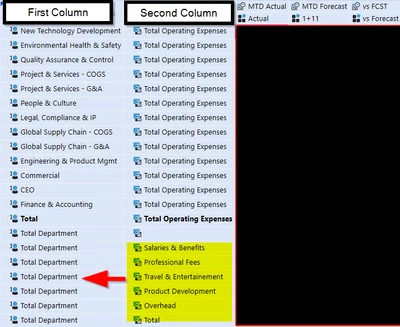
I have a Cube View that is displaying a single dimension in the first column (Departments), and a second dimension (Accounts) in the second column.
FM_0-1659103176916.png


In order to match the formatting of the report that is currently in use I’d like it to display in the first column Departments up to the bolded Total row, then accounts from there on out. In essence it would be  mix of two different dimensions displayed in the first column.


I would also like for the second column to be hidden. I have made some attempts to match the formatting as I described, but without success.

Do you have any ideas on how to achieve this?


Thank you for your time in advance.

Best answer by ChristianW

Use:

UD1#Something:name(|MFAccount|) (or UD1#Something:name(|MFAccountDesc|))

A#SomethingElse:name(|MFUD1|) (or A#SomethingElse:name(|MFUD1Desc|))

where needed.

4 replies

OneStream Employee
July 29, 2022

Use:

UD1#Something:name(|MFAccount|) (or UD1#Something:name(|MFAccountDesc|))

A#SomethingElse:name(|MFUD1|) (or A#SomethingElse:name(|MFUD1Desc|))

where needed.

FM26Author
Newcomer
August 1, 2022

Thank you for your reply ChristianW!

aricgresko
Veteran
July 29, 2022

Christian's comment above should work and essentially what I'm going to add a little bit of extra color to.  I have a very similar use case to the example you provided. 

I would only use Member Expansion 1 in your Rows.  If you use your Department dimension in Member Expansion 1 and your Account dimension in Nested Member Expansion 2, you'll have those two columns appear.

Let's assume UD1 is Department in your case, I would recommend the following.

For everything to the bolded Total row you showed, use the following: U1#TotalDepartment.base:A#OPEX:Name(|MFUD1Desc|)

For everything below the bold, use the following: U1#TotalDepartment:A#OPEX.base:Name(|MFAccountDesc|)


FM26Author
Newcomer
August 1, 2022

ChristianW, Thanks for explaining that in detail. I took your suggestions and applied them and it works as intended! Much appreciated!

FM26Author
Newcomer
August 1, 2022

In regards, to this U1#TotalDepartment:A#OPEX.base:Name(|MFAccountDesc|), why is the bolded part in between pipes? Thanks

aricgresko
Veteran
August 1, 2022

That's a substitution variable used to call out the Account Description within your Member Filter (MF).  In my example, when I called out |MFUD1Desc|, I want the row to return the department and when I called out |MFAccountDesc|, I want the row to return the account.