
Contributor
November 2, 2023
Solved

Conditional Formatting on BWPercent column

  • November 2, 2023
  • 1 reply
  • 0 views

I have the following column member filter. 

S#Actual, S#Budget3, S#Actual:T#YearPrior1(|!Param_Time_Select!|)Period(|!Param_Time_Select!|), GetDataCell(BWDiff(S#Actual, S#Budget3)):Name(BW Diff), GetDataCell(BWPercent(S#Actual, S#Budget3)):Name(BW %), GetDataCell("BWDiff(S#Actual,S#Actual:T#[YearPrior1(|!Param_Time_Select!|)Period(|!Param_Time_Select!|)])"):Name(BW Diff), GetDataCell("BWPercent(S#Actual,S#Actual:T#[YearPrior1(|!Param_Time_Select!|)Period(|!Param_Time_Select!|)])"):Name(BW %)

I'm needing to Conditional format the BWPercent column with %'s, and I can't figure out how to refer to that column with a conditional format that works.   Any ideas?
Best answer by MikeG

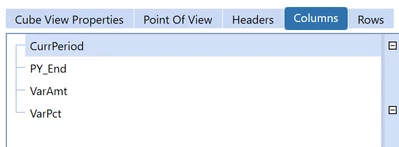
Hi johnal67 , each comma creates a new Column in your Cube View.  Making it difficult to isolate the one instance and format for BWPercent.  The quickest way to accomplish this would be to break out those in to separate columns.

MikeG_0-1698931156327.png

In this case you can isolate the VarPct column definition and format it as a % for display. 

Hope this helps.


1 reply

MikeG
MikeGAnswer
Contributor
November 2, 2023

Hi johnal67 , each comma creates a new Column in your Cube View.  Making it difficult to isolate the one instance and format for BWPercent.  The quickest way to accomplish this would be to break out those in to separate columns.

MikeG_0-1698931156327.png

In this case you can isolate the VarPct column definition and format it as a % for display. 

Hope this helps.


johnal67Author
Contributor
November 2, 2023

That's what I was afraid of I was hoping I was missing something.  I thought I was doing good to not break them up into columns, but your confirmation helps to go forward with doing that.  Thanks!