
Expert
May 26, 2023
Solved

Conditional formatting based on the value of other rows and columns

  • May 26, 2023
  • 2 replies
  • 0 views

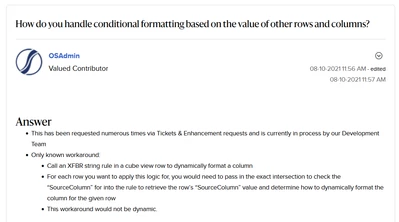
Hi all, does this 2021 OS community post by OneStream still hold true?
AndreaF_3-1685107308710.png


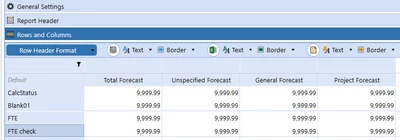
I would like the cells from the FTE row to be formatted in a certain way (for example set the background to red) when the FTE check cell amount is not zero. Is there a way other than the XFBR they suggest (which looks like an overkill for what I need to do)?
AndreaF_2-1685107274460.png

Thank you

Best answer by JackLacava

Not that I know (although CVs are not exactly my forte). As an alternative idea, you could put the check cells on columns instead, side-by-side with the actual value, basically creating a traffic-light report. You would then probably have to override it for other rows.

If this is on a Dashboard, you might want to look into Pivot Grids, which have some additional (and pretty cool) formatting options, including calculated fields.

2 replies

OneStream Employee
May 26, 2023

Not that I know (although CVs are not exactly my forte). As an alternative idea, you could put the check cells on columns instead, side-by-side with the actual value, basically creating a traffic-light report. You would then probably have to override it for other rows.

If this is on a Dashboard, you might want to look into Pivot Grids, which have some additional (and pretty cool) formatting options, including calculated fields.

Newcomer
May 30, 2023

Hi!

In the Cell format, on rows formatting settings, you can define for example:

If (CellAmount <> 0) Then
BackgroundColor = red
End If


AndreaFAuthor
Expert
May 31, 2023

The code you posted checks the value of the cell itself. What I am looking for is formatting based on the value from a different cell (different row to be precise)