Newcomer
January 18, 2022
Solved

Combobox Multiple select option.

  • January 18, 2022
  • 4 replies
  • 0 views

Is it possible to have multi select option in Combo box ( Dashboard component)?


Thanks & Regards,

Madesh K

Best answer by ChristianW

Hi Madesh

At the moment, there is not multi select option for combo boxes.

There is a multiselect option for combo boxes in the format settings. Sergey is right and I'm wrong.

As a work around, we are using grid objects or tree objects.

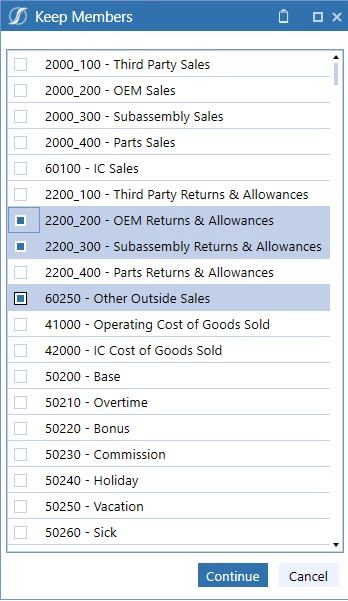
You can embed them in the main dashboard or use them with a dialog (dashboard). The dialog can be launched with a button and pass back a parameter. Both solutions will return a comma separated list of member names.

The grid object can do it very straight forward, because of the multi select feature mentioned by Sergey. For the tree view, you need to code a business rule that implements an multi select data adapter.

I hope this helps and regards

Christian
ChristianW_2-1642513053499.png


ChristianW_0-1642512970016.png


4 replies

OneStream Employee
January 18, 2022

Hi Madesh,

In the Display Format parameters, there is a "is multiselect" option that you might use in case you need to activate multi select in combo box :

Sergey_0-1642502537350.png

Regards,

OneStream Employee
January 19, 2022

Sorry, you are of cause right with your posting.

OneStream Employee
January 18, 2022

Hi Madesh

At the moment, there is not multi select option for combo boxes.

There is a multiselect option for combo boxes in the format settings. Sergey is right and I'm wrong.

As a work around, we are using grid objects or tree objects.

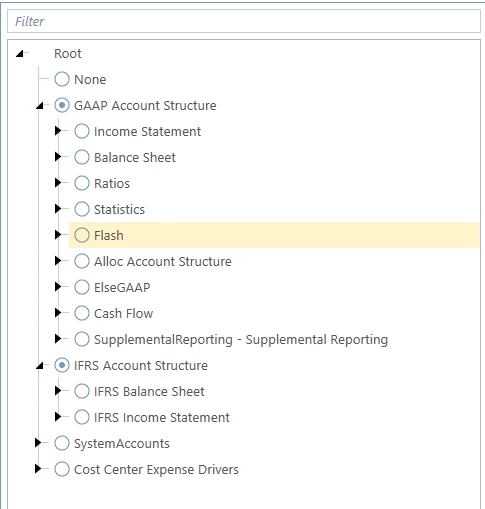
You can embed them in the main dashboard or use them with a dialog (dashboard). The dialog can be launched with a button and pass back a parameter. Both solutions will return a comma separated list of member names.

The grid object can do it very straight forward, because of the multi select feature mentioned by Sergey. For the tree view, you need to code a business rule that implements an multi select data adapter.

I hope this helps and regards

Christian
ChristianW_2-1642513053499.png


ChristianW_0-1642512970016.png


MadeshAuthor
Newcomer
January 18, 2022

Thanks Christian, Will implement it.

OneStream Employee
January 19, 2022

Sorry for offering a complicated (and wrong) answer to this question. The solution is much simpler, there is a multi select option for combo boxes in the format settings (list box has it as well):

ChristianW_0-1642597040361.png

IsMultiSelect=True

ChristianW_1-1642597113853.png

Cheers

Newcomer
November 30, 2022

Hi Christian,

Thank you for the solution above.

How would you connect the parameter in a Cube View, when the Multi-Select combo box is being used?

Context: I am looking to implement a multi-select combo box dropdown to select multiple entities and get an aggregated value in the Cube view.

Thank you in advance.

OneStream Employee
December 25, 2022

Hi Hamza, E#root.list(|!parameter!|) should do the job. Cheers

Newcomer
November 7, 2022

Is there a way to add a select All option, one that will mark all items when active and deselect all items when deactivated? 

OneStream Employee
December 25, 2022

The drop down box takes the last parameter value(s) as starting point. You can delete the parameter or set it with all values, using a button.